▲ 249 points
back
178 comments
This is fun. I'm more of a minimalist with my homelab setup. It's a laptop and an old NAS. I love it either way: running a homelab is a nonsensical and fun hobby in any case.
I feel like we live in a world in which it's either racks or cheap VPSs. In reality, at home, we have some serious CPU horsepower just spinning billions of empty cycles per second. Consumer hardware is insane.
I've handled 10's of thousands of unique visitors per minute and more than a couple front page of Reddit + Hacker News herds on this little laptop through a residential ISP.
Here's my setup (pic down at the bottom): https://kiwiziti.com/~matt/wireguard/
> running a homelab is a nonsensical
Depends, I get a lot of utility from mine, as it manages my media collection for streaming at home and on the go. I've tried using SaaS alternatives and managed hosting of the apps I run, but those experiences were both lackluster and relatively expensive. And since the apps I run and my media collection aren't locked behind proprietary systems or limited APIs that might disappear, the amount of integration and automation makes for a very pleasant experience.
> In reality, at home, we have some serious CPU horsepower just spinning billions of empty cycles per second. Consumer hardware is insane.
I just add my old devices to my cluster and call it a day. Even ancient hardware is suitable for it, especially if you're using old laptops that are optimized for power savings. Even old Core 2 processors in laptops can idle at a low wattage, and TDP can be less than a light bulb's when maxed out.
> Consumer hardware is insane.
With less technical management, I've had repeated, and bewildered, conversations trying to get them to understand that our one "computer" sitting on my desk is many many times faster than the "server" our IT team provides. "But it's a server!".
> running a homelab is a nonsensical
I think a lot of people build a homelab to learn about technologies and get realworld experience deploying them. That was what drove mine for a couple of years. Once you’ve mastered servers and networking and so on, then it just becomes a fun hobby, I agree there. But someone who wants to get into networking and the like (and who lacks experience) is definitely going to need to practice with real or simulated networks to get good at it.
looks better than my quick and dirty wireguard setup to get NAT Type: A behind CGNAT on game consoles - Basically put whatever is connected to a device in a "public DMZ", separate from your network: https://raw.githubusercontent.com/genewitch/opensource/maste...
Wireguard is both very frustrating and very cool. I'm currently using it similarly to give a VM a public IP, and i'm testing the details on getting multiple SSL/https hosts behind that single IP, which is something you couldn't easily do a decade ago without the host with the single IP having all of the certificates and "MITM" the entire session.
Speaking of "CPU horsepower" i just replaced a 1.5kW HP[0] server with a .2kW Ryzen 5950x "server" that is about 5% faster overall - don't forget that old stuff, while capable, adds to the electric bill, usually at a constant rate.
[0] the iLO (lights out) actually reported the server's power usage in BTU. It drew the same power as a portable space heater.
> In reality, at home, we have some serious CPU horsepower just spinning billions of empty cycles per second. Consumer hardware is insane.
Yeah. I've got my search engine basically a beefy gaming PC with no graphics card and 128 Gb ram. I've not only gotten supposed HN death hugs multiple times, I've had my search engine see multiple queries per second without as much as flinching. It took Elon Musk tweeting a link to one of my blog entries before I started getting more traffic than my computer could handle and it started dropping a few connections.
Modern consumer PCs are ridiculously powerful if you make good use of the hardware.
> In reality, at home, we have some serious CPU horsepower just spinning billions of empty cycles per second.
To be fair they're not spinning every single piece of the CPU.
My desktop can play games from 2009-ish, but at idle it clocks down to like 30 watts.
It could play games from 2011 if I put the GPU back in, but the GPU's idle power draw is ridiculous...
Thanks for the guide. Congrats on the wedding!
Mines an old laptop and a new NAS.
Anyone else annoyed at how narrow the term Homelab really is relative to what it could be? Any scientific or maker hobbies could take place in a "home lab," from breeding seedlings, to soldering and electronics work, to 3D printing. But it really means just networking and servers?
Seems too narrow to me.
I don't think anyone would object to wider usage, it's just that the sysadmin community is the only group to have adopted the term so far.
My personal homelab (a stack of old laptops connected to a network switch) is mostly built around various experimental antenna arrays used for rtl-sdr hobbies (aircraft and maritime telemetry collection mostly) + home automation over a zwave mesh network. The home automation ecosystem also has a lot overlap with automated gardening/growing, since automated sensing and irrigation are a great use case for tools like home assistant.
I often wish, that this kind of thing would be called something more like homedatacenter
It's likely easier, safer and more socially acceptable to set up this kind of home lab than the kind of maker spaces you are talking about. A lot of people go to (shared/public) maker spaces precisely because their home is not suitable for that kind of physical experimenting. You probably need space, money and expertise to do home experiments of that sort and then it's probably generally wise to keep it on the down low in most cases so you don't freak out the neighbors or otherwise draw problems to yourself.
Agreed. I always click the link expecting some kind of electronics or bio lab, and am instead greeted by a server and some networking equipment.
I am not really interested in reading about this kind of stuff[1]. I have a few raspberry pi's that serve as my "home lab" and that is all I really need right now. But I suspect the term took off because it gets a bunch of people like me to click.
[1] Not that I don't think it should exist, its just not high on my list of interests right now.
>Anyone else annoyed at how narrow the term Homelab really is relative to what it could be?
I wasn't before I read this thread!
I mean, my "home lab" are old computers from 2008 to 2016 and half of what I "do" involves simply testing what weird installations (eg netbsd) I can get up and running. It's for tinkering -playing; the "lab" part coming from experimentation: "What happens when I do this...?"
I agree when it comes to the definition being to narrow. Then again, I mostly engage with it on /r/homelab and the HN attitude seems to be much more restrictive...too restrictive for my tastes, personally.
Agreed. My home lab does include some services and networking to support them, but also some nutso wifi and other radio data hardware, electronics, 3d printing, large format 2d printing, mechanical fabrication, precision metrology...
I agree. “Home Data Center Lab” is not always implied.
A little off-topic, but I love the style of this writer.
The humor is a little goofy in the best way; the structure is detailed, but still conversational. It just feels very… personable.
Like — computers are so goddamn neat. We should all remember to have fun with this stuff sometimes.
I've never understood why fiddling with IT equipment in your home is considering a "home lab" since you aren't necessarily creating anything (like a laboratory would do), you are just integrating together other people's industrial components to serve non business purposes. The most egregious factor of this hobby is that you are often buying equipment that costs enterprise prices with your own money, whether or not it is used equipment.
> I've never understood why fiddling with IT equipment in your home is considering a "home lab" since you aren't necessarily creating anything
To paraphrase the first item in the HN guidelines:
"anything that gratifies one's intellectual curiosity."[0]
You can get to explore configurations and scenarios you might never be able to do at work. But it's not about work, it's about scratching an itch.
> The most egregious factor of this hobby is that you are often buying equipment that costs enterprise prices
If you know where to look you can pick up enterprisey kit cheap. It may not be the latest and greatest, but it's probably good enough to play with.
Just because you don't understand the attraction of this pastime (or any pastime) you don't get to judge or complain about folks who enjoy tinkering.
Once upon a time I built out a home lab to run a piece of software called Zebra to learn about BGP4 and CIDR. It was about scratching an itch. If energy prices in the UK weren't so utterly bonkers at the moment then I'd love to build out a new lab to mess about with some stuff. Again, to scratch a curiosity itch.
I view those as separate things.
I have a home ESXi server which I use to host all my own stuff. I don't consider that a lab as such. It's just my home production infrastructure.
And then I have another ESXi which hosts the stuff I'm testing for work, and only work.
In my work home lab I have full access which I don't do even in the testing environment at work due to fragmentation of responsibilities. Or if I do I step on people's toes when trying stuff out that belongs to their realm. Most things are interconnected so testing something at work usually gets slowed down by the need to involve other people who don't always have time or interest. That's where my own lab comes in.
It's also a lot faster due to not needing VPN and having to deal with servers halfway across the world. And not having to deal with the evil SSL-MITM Internet proxy at work saves me SO much time.. Of course that work needs to be done to put it in production but a lot of stuff never makes it to that stage and then figuring how to smooth things with the proxy is just wasted effort.
I'm very pleased using PVE https://en.m.wikipedia.org/wiki/Proxmox_Virtual_Environment for my homelab
I manage a network of a few hundred multi-layer switches, several routers, and a couple thousand wireless access points across a couple dozen campuses.
My home network is an Eero. The network engineer’s kids have no homelab, as it were.
Occasionally, I get the urge to build out a proper homelab but quickly realize I don’t want to come home and deal with the same stuff and put the Eero back in.
It’s not that I don’t like learning and experimenting, it’s just that I get to do that all day at work and I need some work/life balance.
But, I still love seeing these posts and commenters chiming in with their own configurations.
I have 3-node vSphere cluster with 36 cores, 300 GB of RAM, bunch of different disk options (magnetic, SSD, NVMe)
It is all powered by Ubiquiti networking gear.
VMware VUG is providing free and legal VMware licenses. I get to run VSAN, on top of it I deploy Kubernetes and I can decide if my pod wants to use poor performance VSAN disks (like EBS on AWS) or faster local NVMe‘s.
These are just couple of things I can make at home. Everything started as an experiment and it started to look like a replica of what we can have in a datacenter, but without a SLA.
First of all, all these stuff is extremely fun for me. Secondly, I won‘t go into details but as a cloud consultant, this thing I started as a hobby became one of the big boosters of my career. I never expected such an effect but I am extremely impressed by this.
My comments:
- network switches: if you want enterprise features, low price, higher stability.. and you are willing to deal with painful configuration: check out Mikrotik - mentioned servers consume quite some electricity, check out this Dutch server thread on how to have efficient server for inspiration: https://gathering.tweakers.net/forum/list_messages/2096876 (use Google translate) note that the Framework main boards also look quite nice as server - also check out k8s at home template: https://github.com/k8s-at-home/template-cluster-k3s it uses GitOps to setup services which has proven very valuable to me by messing with configurations. I also build a search for helm chart releases: https://whazor.github.io/k8s-at-home-search/ - if going cluster mode: having a NAS for storage is more stable than using kubernetes storage solutions
All in all, I learned a lot about servers and networking by doing this as a hobby.
These are always a hoot to read.
Attitudes toward dust ingress in particular delight me. Look inside any old Dolch data acquisition unit or tire alignment computer from the 1980s and find minimal reason to be horrified.
To think a home environment would necessitate anything special is excessive.
Pizza restaurants,OTOH.
Am I the only one who just slaps a few vms together on an umanaged switch?
I don't need to tag anything and the two vlans I have are for the wifi and the house. One vm runs openwrt, another openmediacault, and then I have arch for my dev projects. Psu hanging out sure but all that is just on a fold out table under the stairs and it's been rock solid for 3 years.
Don't get me wrong it's nice to do this stuff and I'm not knocking people for spending so much time on it but when you spend your day at work logging into systems and fixing broken junk the last thing I want to do is come home to a dead network or vm issue to solve.
Great to see a write up about someones experiences building a homelab.
I love the homelabs, and I recently built a new house and made some dedicated space for mine.
https://www.reddit.com/r/HomeDataCenter/comments/ktz6yo/my_s...
I added 20KW of solar as well to offset to power usage.
It is interesting to see what other people have built, why they made the choices they did, and what they are using it for.
See, I have no interest in running large server hardware at home. I did it different.
At first i Had a stack of 2-3 old laptops running stuff. Now I just use 4 raspberry pi 4s, with 8gb. It lives in a cubby in my office desk. Low energy, low maintenance and works really well. Got rid of the laptops.
My network is the TPLink Omada stuff, sittign on some shelves in our family room. Everythign is wifi and I run a 2nd ap on the opposite side of the house using MoCA 2.5 to connect them over the coax in the 2 rooms to improve performance.
I’m always sad that 10”/10.5” racks aren’t more common for this sort of thing. I have my “homelab” in one and it’s the perfect size for a home router, an 8 port switch, a Raspberry Pi, a Thinkcentre tiny, and a 1-bay NAS.
Basically nothing actually rack-mounts in 10.5” so I currently have things cable-tied to shelves, but I’m planning to 3d print some adaptors.
My setup: https://i.postimg.cc/xTpLPFQD/image.jpg
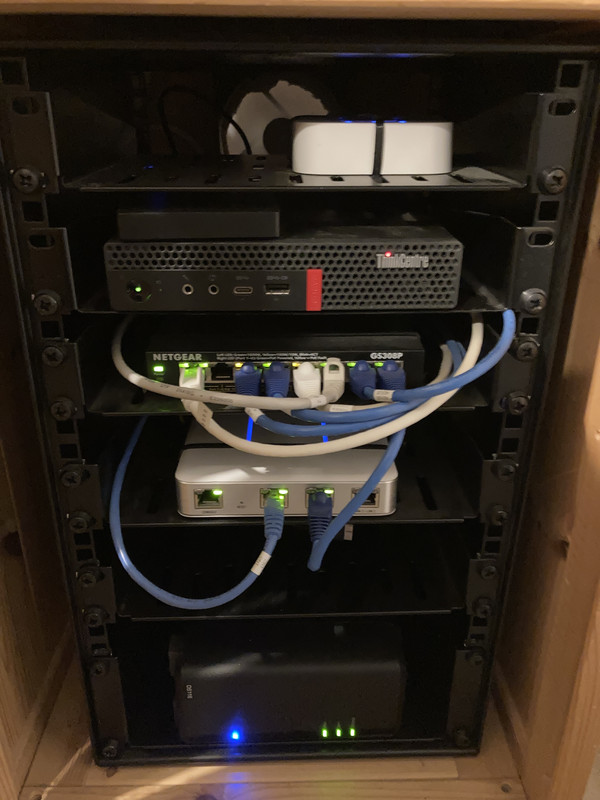
For the UPS, I always err on the side of ones that are PFC-compatible, pure sine wave, line interactive. Partly because some of the gear I rack has PFC PSUs, but also because I don't want to be flirting with edge cases in other gear. I've owned 3 such rackmount UPSes, but it doesn't seem to be the default.
Reminds me of the best homelab setup I've ever seen:
https://www.reddit.com/r/homelab/comments/cgi5gq/homelab_wit...
> As you know, trying out new things on production equipment never ends well.
That is not my experience. Most of the time it works just fine if researched well in advance.
The problem is just the impact for the few times it does not go well. That's why you have test environments. And test groups in production for the first rollout.
My home lab is more to try out the benefits of different options, especially as I work for a huge multinational. Admin rights are split among different teams and sometimes the others don't understand what I need. It's really helpful to have full access to my own lab so I can show them what I need from them and why it works best a certain way. Without access that's hard to figure out.
With rising energy costs I recently coalesced onto a pared down homelab.
2U server with 6 4TB drives (ZRaid 2 leaving 16TB of usable space) running on an Asrock Rack WSI 246 mini itx board, a Core i3 9100T (35w, can be configured as a 25w part) and 32GB of ECC DDR 4.
It idles around 20w and going full pelt with all disks running at around 40-50w.
This is running UrBackup for the computers in the house to backup to, SeaFile for the phones, a Minecraft server for the kids, Plex, Wireguard (for remote access) and InfluxDB for collecting metrics.
Whilst playing with ex enterprise kit would be fun, the noise, and the power consumption, just isn't worth it to me.
I'm not a network guy, so apologies for the stupid question, but what is the patch panel for in this setup? It doesn't really look like it has a purpose from my view.
I made a rack out of some dumpster-dived supermarket shelves, lumber, a couple of truck air filters and a forced draft fan. The thing doubles as drying cabinet for produce (mint, mushrooms, fruit etc.) by having the equipment in the top half of the rack followed by an air flow divider and 8 rack-sized metal-mesh-covered drying frames. From top to bottom the thing contains:
* HP ProCurve 2910al-24G J9145A 24 port Gigabit switch (managed switch, €47)
* HP DL380G7 with 2xX5675 @3.07GHz, 128GB (ECC) RAM and 8x147GB SAS drives (€450)
* NetApp DS4243 (24x3.5” SAS array, currently populated with 24x650GB 15K SAS drives (4 as inactive spares), €400)
* the mentioned airflow divider
* 8 drying frames
It is managed through Proxmox on Debian and runs a host of services including a virtual router (OpenWRT), serving us here on the farm and the extended family spread over 2 countries. The server-mounted array is used as a boot drive and to host some container and VM images, the DS4243 array is configured as a JBOD running a mixture of LVM/mdadm managed arrays and stripe sets used as VM/container image and data storage. I chose mdadm over ZFS because of the greater flexibility it offers. The array in the DL380 is managed by the P410i array controller (i.e. hardware raid), I have 4 spare drives in storage to be used as replacements for failed drives.
The rack is about 1.65m high, it looks like this (here with the old D-Link switch (now deceased) and minus the DS4243 array which now sits just above the air flow divider):
In the not-too-distant future I’ll replace the 15K SAS drives with larger albeit slower (7.2K) SAS or SATA drives to get more space and (especially) less heat - those 15K drives run hot. After a warm summer I added an extra air intake + filter on the front side (not visible on the photos), facing the equipment. This is made possible by the fact that cooling air is pulled through the contraption from the underside instead of being blown in through the filter(s).
I chose this specific hardware - a fairly loaded DL380G7, the DS4243 - because these offered the best price/performance ratio when I got them (in 2018). Spare parts for these devices are cheap and easily available, I made sure to get a full complement of power supplies for both devices (2 for the DL380G7, 4 for the DS4243) although I’m only using half of these. I recently had to replace a power supply in the DL380 (€20) and two drives in the DS4243 (€20/piece), for the rest everything has been working fine for close to 4 years now.
On the question whether this much hardware is needed, well, that depends on what you want to do. If you just want to serve media files and have a shell host to log in to the answer is probably ‘no’, depending on the size of the library. Instead of using ‘enterprise class’ equipment you could try to build a system tailored to the home environment which prioritizes a reduction in power consumption and noise levels over redundancy and performance. You’ll probably end up spending about the same amount of money for hardware, a bit more in time and get a substantially lower performing system but you’d be rewarded by the lower noise levels and reduced power consumption. The latter can be offset by adding a few solar panels, the former by moving the rack to a less noise-sensitive location - the basement, the barn, etc.
As to having 19" rack equipment in the home I'd say this is feasible as long as you don't have to sit right next to the things. Even with the totally enclosed, forced-draft rack I made the thing does produce enough noise to make it hard to forget it is there.
I initially thought this was a tech blog by Hayden James, the musician. [1] I was like "wow, what a multi-talented guy!"
Alas, it's not the same person.
I like this post because I feel like I don't see a ton of I.T applicable posts on the site. Thanks!
This is really cool. I’ve been wanting to build my own lab, but I’m a bit worried about power consumption. If I do build something, then it would probably be something I power up and down as required.
That said, are there “Cloud” versions of this? Can I get my feet wet that way?
As someone who has never done this before, what's the benefit of setting up a server rack, compared with just using my desktop? Is it purely for the fun of tinkering with hardware? Is there something that's not doable on a desktop?
I'm disappointed, I've read it hoping to find how to set up a scientific laboratory at home but it's just how to install some servers
wow! Pretty good :)
this is not for complete noob, fyi.
Just get a 12 core+ Ryzen and a bunch of RAM (64GB+). It'll be more efficient/faster GHz than a bunch of old servers and more than capable for running three node clusters.
It's time to update this kind of guides with at least 2.5GbE networking. I suspect most FTTH ISPs will start defaulting to 2 or even 5 Gbps soon (mine already offers theses speeds in PNW, but at premium costs).
There's very few consumer options at 2.5 / 5 GbE; you can usually pick up cheaper 10 GbE gear (but on older standards, non-multi-gig compatible).