▲ 31 points
back
36 comments
>Stuck between the Command and Control (ctrl, or ^) keys, the Option key, also called Alt key, because of the switch symbol ... that adorns it
No.
It's called the option key because it was named that on the original 1984 Mac, full stop. It had one purpose: as an auxiliary shift key, giving access to additional characters and to accents via combos.
It's never called the "Alt Key", at least not on MacOS. IIRC the option key had the word "Alt" above it in the late 1990s primarily to provide some keyboard compatibility with virtual machines etc. that ran Windows 95: in this case, the Option Key served as the IBM PC's Alt key. Later USB Mac keyboards were set up to map Alt and Option to the same keymapping so Mac keyboards could be used on PCs and vice versa. New Macs no longer include the word "Alt".
What you're calling the "switch symbol" didn't show up until much, much later. And the symbol is not called the "switch symbol". It's called the Option Key Symbol, Unicode U2325. I doubt it's meant to imply "switching" of launching options.
It's worth mentioning that the NeXT workstation keyboards also had Option keys that worked effectively identically top the Mac. Late-model Apple IIs had open- and close-apple keys and supposedly the close-apple key served the same function, but I'm not convinced.
> It is (almost) never used alone, but in combination with other keys, to launch various actions.
The primary function of the option key has always been as a second shift key. But just like the shift and control and function keys, the option key can be used as a modifier key for the command key. Various apps have come to use it for their own unusual purposes as well. This has a long history: even the original MacPaint used the option key in combination with mouse clicks to do alternative things (same thing with the shift key).
This notion of multiple shift/modifier keys is quite old: the author might look up the concept of the "bucky bit".
The author also seems to have neglected a HUGE use of the option key in Terminal.app: as Emacs's META key.
> And the symbol is not called the "switch symbol". It's called the Option Key Symbol, Unicode U2325. I doubt it's meant to imply "switching" of launching options.
It doesn't matter what it's called in Unicode, it is literally the symbol for an (open) switch in an electrical wiring diagram. It's trying to invoke that bit of adjacent-domain "visual jargon" to imply to people who are first-time computer users — but who have experience with electronics — what the key will do / what it is used for. It's a switch; it switches the function of other keys!
And it doesn't just switch the function of commands; it also switches the function of typing regular keys — i.e. it momentarily switches your keyboard layout to a second, alternative "page" of the same keyboard layout (which is essentially the same as the "Alt Gr" key in Windows.)
So do shift, control, and function, in these same contexts. Like these modifier keys, Option's primary function isn't "switching the function of other keys". Its primary function is, and always has been, as a secondary shift key for entering text.
"Secondary shift key" is a bad model for it, though; the Shift key has a very specific meaning (ever since typewriters): it temporarily shifts an imaginary "selector" within the keymap matrix between the lower-case vs upper-case "rows" of the keymap; with the aim that it should be either intuitive or visually evident on the keyboard, what the "upper-case equivalent" of a given lower-case character is.
Option in its AltGr ("Alternative Graphics"!) form doesn't do anything so intuitive; the symbols it gives you have no clear relation to your keymap, and often aren't printed on the keys, either. This is because Option/AltGr comes from an entirely different heritage and thought process.
IIRC, way back when, there were actually electromechanical typewriters with support for loading in two fonts — two separate literal matrixes of letterpress metal glyphs. I think some of the later IBM Selectrics (the ones that have the font on a "ball" and rotate it around to select the glyph) could do this. These had an AltGr-Lock kind of key, that would switch the active font — literally juggling the balls around inside the typewriter.
Some would use this to just switch between e.g. roman vs italic fonts within the same font family; or to switch between "compatible" font families from the same type foundry, where the same glyphs occur in the same positions. But others, working in multi-language environments, would use this to quickly switch between fonts of font-families designed for entirely different scripts. You could have a latin-script font loaded in as primary, and a greek-script or cyrillic-script font loaded in as secondary. Obviously, in these cases, the glyphs on your keyboard would only be accurate for (at most!) one of the languages you're using. You'd just have to touch-type the other.
Computer Option/AltGr keys, when they were invented, did essentially the digital version of the same thing. They weren't for selecting different glyphs from a single coherent glyph-set; rather, they were for momentarily switching between a primary and secondary glyph-set, that have nothing to do with one-another and might actually have many redundant glyphs between them.
This was a result of PC hardware OEMs doing customer discovery for addressable markets, and finding that many markets either had one dominant language with a lot of characters; or ~two dominant languages, each with not-that-many characters. This in turn resulted in two alternate realities, where which reality you experienced depended on your market:
1. The evolution of computers that shipped with an OS with a single built-in "code page" that was a fixed combination of a primary and secondary script into a single 8-bit repertoire; with a keyboard layout where AltGr would be a momentary switch to let you type characters from the secondary script; and where characters from both scripts could be on screen at once, as they were actually all part of the same page; and
2. the evolution of computers that shipped with an OS with multiple supported "code pages", where each code-page was entirely dedicated to a single script; and where some key combination would allow you to switch the active code page for the entire OS (possibly restarting the shell in the process.) This would allow you to alternatively work on documents in multiple different scripts, but never to combine scripts in a single document†. Computers in these markets didn't get an AltGr key.
† Unless one of the scripts did something very clever, like Shift-JIS did: the "Shift" in the name is to indicate that, somewhat like UCS-2, all the thousands of two-byte https://en.wikipedia.org/wiki/JIS_X_0208 characters are encoded using only surrogates from the upper 128 slots of the SJIS code page — leaving the lower 128 free to be a (rough) mirror of ASCII.
Unlike AltGr, the option key didn't just define alternate code pages. It also was employed in a scheme by which you could add accents to a variety of characters: for example, option-i, then u, would make û, and option-i, then o, would make ô. The Mac/Lisa had its own high-bit ASCII codemap four years before Latin-1 came into being. The original Mac also came with a special piece of overlay software -- the keyboard viewer -- which still exists on MacOS 40 years later and which was used to display the current keystates and mechanisms for creating accents.
> It's never called the "Alt Key", at least not on MacOS. IIRC the option key had the word "Alt" above it in the late 1990s
They continued doing this until relatively recently; here’s a photo of an Apple keyboard released in the last ten years:
https://images.macworld.co.uk/cmsdata/features/3462401/Mac_k...

I think they might have stopped doing it around the time they released the wireless versions with the Lightning port. Pretty sure the wireless versions with AA batteries had “Alt” on them.
> I think they might have stopped doing it around the time they released the wireless versions with the Lightning port.
According to some unattributed blurbs on Wikipedia, the "alt" sublegend would have disappeared in 2017, when the first-generation "Magic Keyboard with Numeric Keypad" replaced the full-sized "Apple Keyboard" in the image you linked to. The first compact "Magic Keyboard" had "alt" when it was introduced in 2015, as can be seen in reviews on the web from that year.
But ... Those are the US-English variants. There are also many keyboards with other regional layouts and those have sometimes had slightly different legends on modifier keys.
> the Option key, also called Alt key, because of the switch symbol ⌥ that adorns it
Oh, is that what the squiggly symbol represents? I've been looking at it for decades without seeing anything more than an abstract shape.
The switch symbol dates back to the very first international Lisa keyboards from 1983. They needed a language-independent symbol for the "Option" key in 1983, that's what someone chose, and it stuck.
Some other keyboard trivia:
- The 1983 Lisa used the Apple logo for its command key. The 1984 Mac used the cloverleaf symbol instead because Steve Jobs didn't like seeing so many Apple Logos in the main menus.
- The command key has been around since 1983, but is was never labelled "Command" on the US-English keyboard, nor was that key referred to as "Command" in the documentation. It just lore that this strange cloverleaf key was called "Command", and passed down through oral tradition. Apple finally labelled the key in the late 2000s.
- Apple has been very conservative about its keyboard layouts and symbols. The original Mac and Lisa had separate Enter and Return keys. The separate "Enter" key survived will into the 2000s iBook and Powerbook keyboards. It was finally removed with the MacBook in 2006.
- Likewise, the Apple Logo was added to the command key in 1986, for compatibility with the Apple II. It wasn't removed until the late 2000s.
- The Apple Extended Keyboard from 1987 was Apple's first keyboard to use a PC-style 104 key layout. This keyboard includes all of the PC-specific text such as Alt, Scroll Lock, Print Screen, etc. This is how the Option key came to be knows as "Alt" on non-US keyboards.
> The command key has been around since 1983, but is was never labelled "Command" on the US-English keyboard, nor was that key referred to as "Command" in the documentation. It just lore that this strange cloverleaf key was called "Command", and passed down through oral tradition. Apple finally labelled the key in the late 2000s.
Nope. It was referred to as the "Command Key" many, many times in the original 1984 Mac manual. See the index:
https://vintageapple.org/macmanuals/pdf/Macintosh_1984.pdf
The NeXT workstation, circa 1987, actually replaced the cloverleaf symbol with the word "Command".
https://en.wikipedia.org/wiki/File:NeXT_Keyboard_Command_Key...

It's a plain electric switch symbol. It's funny how such buttoned-up devices as macbooks carry a raw engineering symbol right on their faces.
Makes up for the command symbol ⌘ next to it that was stolen rather randomly from the Swedish map symbol for a place of historical interest: https://en.wikipedia.org/wiki/Command_key#Origin_of_the_symb...
It's stylized to the point where it's not really recognizable without prior context, though. A bit like the I / O markings on power switches which are apparently literally meant to be a 1 (on) or 0 (off), which makes perfect sense except they're usually not rendered as numerals and there are too many possible interpretations for it (open vs. closed circuit? "in" / "out"? "inactive" / "on"?) to be easy to figure out just from the markings. This is even more irritating since we're printing things on the switch in the first place, so why not just write "on" / "off" and be done with it?
IDK, to me it's how people draw it on schematics when they are not using a CAD :)
http://www.learningaboutelectronics.com/images/SPDT-switch-c...
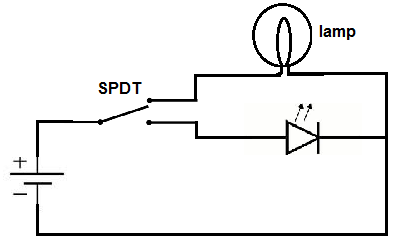
Kind of a silly choice when you think about it. They're all switches.
But is it a railway switch or an electric switch?
Either way, it is a changeover switch for selecting between two options, not a momentary on/off switch like the key switches on a keyboard.
Like a train switching tracks! I never noticed.
So what does ⌘ represent?
That you are using a mac? I ised to still call it the super or windows button, because my macbook ran linux. This whole article is mac centric, but it doesn't seem aware of that. Most keyboards don't have the switch symbol, most just say alt, and its where the mac has the command key.
> This whole article is mac centric, but it doesn't seem aware of that.
I found it pretty clear from the title, site affiliation disclaimer, background image, section headers, language, and overall theme of the article. What's misleading you?
“Place of interest sign,” according to the Unicode spec. Also, command key and OS key as secondary meanings.
Apparently it is "Command" but also the Swedish campground symbol?
https://www.folklore.org/StoryView.py?story=Swedish_Campgrou...
It is on Swedish road signs indicating a sight/attraction/monument, usually an ancient one.
It is a stylised ribbon/snake pattern that resembles one that you could find on a rune stone. <https://xn--vgmrken-5wac.se/tag/sevardhet/>
A variation of the symbol is also the symbol for the National Heritage Board, which is in charge of protection of ancient monuments.
The road sign for "Camp ground" has a stylised tent: <https://xn--vgmrken-5wac.se/tag/campingplats/>
A castle.
> Susan Kare states that she has since been told that the symbol was picked for its Scandinavian usage due to its resembling the shape of a square castle with round corner towers as seen from above looking down, notably Borgholm Castle.
Source: https://en.m.wikipedia.org/wiki/Command_key#Origin_of_the_sy...
So what does ⌘ represent?
The revisionist history is that it's a Swedish map symbol repurposed.
People who were there will tell you that it's called "double infinity" and was used because the regular infinity symbol lacked visual weight and it was thought might be too similar to other keys.
Susan Kare selected the symbol herself. I wouldn't exactly call her explanation "revisionist".
Macintosh Folklore disagrees. That's literally as close to "people who were there" as one can get.
https://www.folklore.org/StoryView.py?story=Swedish_Campgrou...
Interesting. Though I'm curious why infinity was even a consideration in the first place.
Interesting. Though I'm curious why infinity was even a consideration in the first place.
That part I don't know. Maybe just because it's geeky, and the original Mac team was certainly that; even the ones involved in its physical design.
A propeller. On the early prototypes of the Mac, that key was used to fire the torpedoes.
Thanks for extracting that interesting tidbit. I was in the same boat, but now I can put a check mark next to "learn something new today."
Modifier keys feel like a Wild West. I really wish the semantics were:
One key owned by the OS.
One key owned by the App.
One key owned by the Context.
If this were true, configuring keys for web apps, for example, would be far less of a mess. A website would only own the context key and would never fear clobbering other hotkeys.
I have a spare button in my second layer layout on my mouse. I should map it to option+click and see how I like it.
The mouse is a Ploopy mouse. QMK, open source schematics, 3D printed parts, loads of useful buttons. Highly recommended if you're prepared to edit C code to set its layout. https://ploopy.co/mouse/
Slaps forehead
I was about to reply and say how I have a qmk board and have been deliberating about getting a ploopy for a while but I’m too accustomed to my 13 button mouse…
And then I reread your comment
> second layer
For whatever reason, something so fundamental to qmk such as layers didn’t even occur to me as a possibility for a mouse. So thank you for indirectly getting me around that weird mental block haha!
Another use for the Option key that I didn't see in the article: if you hold it down and click to another application (or on the desktop), all of the current application's windows will be hidden. It's the same effect as the menu item [Application] > Hide [Application] (⌘H).
Don't know why I'm surprised, but what a good article! In-depth, imformation-dense, and easy to read. Goes on way past the point when the author could have stopped writing and still got shares on social media.
I've always liked the Mac's hidden option-key features. It's a tasteful way of offering a lot of functionality without cluttering up the interface with things you don't need most of the time. To me, it's nicer than having to declare yourself a “power user” and switch on all the extra features for good.
So, it was good to see that even in the latest MacOS releases, which I tend to feel are on a bit of a steady decline from the peak of Apple good taste, they're still adding secret option-key treasure to some of their new stuff. Gives a bit of hope for the future of the platform, I suppose.
The option key layer is undoubtedly useful for many people but for someone like me that wants to use this free modifier for custom bindings jeez it was maddening at first to work around that Apple stuff. Option + IJKL inverse T for arrow keys (unfortunately got into vim after I built up that muscle memory) and option + P for enter among many others