▲ 325 points
back
173 comments
Oooh, now do Orca cards next. Seattle is one of the tech capitals of the United States, and on top of the metro system just being not great, it's also technically inferior to nearly every single other major city that I've used public transit. Pick any European city, CDMX, Denver. They're all light years ahead of Seattle. Denver might have been my favorite.
Fun fact, one of the orgs that runs Orca actually wrote a blog post mentioning they were adding NFC support to their Android app (with some absurdly long timeline). That post is no longer to be found, and of course, years later, that functionality is absent.
Google Wallet will soon support this (from a few days ago): https://blog.google/products/google-pay/commute-around-the-w...
edit: linking to Google's blog directly
My local transit system just added tap-to-pay that works with any credit card (or Apple/Google Pay etc.). As long as you use the same card it handles transfers, multi-day passes, etc. seamlessly as well—it will automatically ensure you're getting the correct rate (e.g. no charge for passes or rides after a certain number within a certain period).
I wonder how much it costs to maintain a system to collect fares compared the small portion of funding most transit systems would lose from going fare free.
Related: isn't there a way to "clone" an NFC card using (rooted) Android?
I have been looking into how feasible it could be doing so on iOS since my office door opens via an NFC card, but iirc Apple has a tighter grip on the NFC hardware than with general PassKit, meaning that a regular app can't do that.
https://info.myorca.com/news/can-i-use-my-phone-to-pay-for-a...
Tap to pay coming to orca in 2023, they’ve got ~2 months left for it to be true
I’m optimistic because google recently put out a post that google wallet will support ORCA soon (as shared by another commenter)
This, really this. Since Washington state doesn’t have an E driver license yet (like say Utah), I carry around three cards in my iPhone (orca, DL, a backup credit card just in case NFC isn’t supported). I dream of the day when orca actually supports a phone based IC card, and a phone based DL is accepted as well.
The reason they replaced all the Orca card terminals last year (and issued a new generation of cards) was, in part, to support NFC through the wallet apps. It's been a multi-year migration.
https://info.myorca.com/news/can-i-use-my-phone-to-pay-for-a...
The post still exists, but no updates since then
Best transit card I have used has been in HK. The value on the card can be used in small shops around the city up to $150 dollars.
For the Android users around who hate Google Wallet because it, like Apple's Passbook, doesn't allow you to just put in any old barcode, there is a delightful app on F-Droid (not on the Google Play Store, unfortunately) called Loyalty Card Keychain ( https://f-droid.org/en/packages/protect.card_locker/ ).
This app allows you to simply enter a number (or scan an existing barcode), choose a barcode type (with lots of options, including Codabar!), and save it. Selecting the entry on the app's main screen shows the generated barcode and does the screen-brightening thing. Also the app opens super fast because presumably it doesn't do anything but, you know, displaying barcodes.
It has only one purpose but it may well be my most favourite app. I've even used it to transfer a barcode from some label in the supermarket to the self-checkout post, where for some reason the supermarket assumed that you use the hand-held self-scanning devices that I also don't like.
EDIT: it seems they want you to use Catima instead these days. Trying it briefly it's similarly simple, and seems to be based on the same codebase.
For Apple, I use Pass4Wallet to generate the ‘cards’- which I can then import into Apple Wallet. It’s inconvenient, but gets the job done and has a great privacy policy.
There's an app that lets you add whatever barcodes you want into Google Wallet: https://play.google.com/store/apps/details?id=color.dev.com....
> for some reason, passes are cryptographically signed, and they have to be signed with a key known to one of Apple’s certificate authorities. Cryptographically signing these files makes some sense when you consider that passes were designed to get automatic updates from their vendors; for example, your boarding pass for a flight reflecting gate changes or changing your seat assignment.
How does this make sense? There’s a perfectly well supported system for doing this: HTTPS.
Maybe Apple wants passes to be verifiable by the phone offline instead of just when updated? This still seems silly — a malicious actor could replace a pass instead of updating it.
Having the initial pass specify the public key that it accepts for updates would be sufficient. Having an association with an Apple developer account doesn't help for the updates problem at all AFAICT.
The only reason I came up with for the blessed-by-Apple requirement I came up with is selling fake tickets. There is no way to tell (with or without that requirement) whether a pkpass file with a "ticket to concert X" is actually legit. So, one can try to combat the (potential?) problem by responding to complaints of fraud by revoking the corresponding developer's account. However, that doesn't seem like a solution either: developer account are probably way cheaper than how much you can gain on fraud before you get caught in that way.
Gosh. I just emailed myself a .png of the barcode containing my library card number and open it in, like, the Photos or Gmail app when I'm at the kiosk.
They did specify that this was the hard way. :-)
Wallet passes allow you to define locations and timespans where the pass is "relevant". I've used the app MakePass to create a pass with my StarBucks membership code and when I'm nearing my usual shops, my phone will automatically suggest the StarBucks pass on the lock screen.
Same with event tickets. I define a location and timespan and when I arrive at that location, my phone will suggest the pass automatically without me having to look for it. Also, after the event, it won't suggest it anymore and move the pass to the "Expired Passes" section to not clutter the main view.
MakePass: https://pvieito.com
This was a great blogpost, but then ends with:
> I will note that I have not yet tested this pass in a real library yet
I get this project was mostly for fun, but why not spend the 10 minutes it takes to test the final solution before sharing your work?
Only slightly related but my preferred way to generate barcodes is the barcode writer in pure postcsript.
I solved this problem by taking a photograph of my library card. To check out a book, I load the picture and hold it up to the scanner.
For anyone wanting to do something like this on an Android phone, there is Catima (on Google Play and FDroid), which supports many types of barcodes.
Those cheap laser "1D" bar code scanners cannot read off a screen (except maybe eInk). It sucks because the supermarkets I frequent have their loyalty cards based off barcodes. Fortunately, barcode readers emulate keyboards so you can just type the code on a keyboard.
> Our local libraries, The Seattle Public Library and the King County Library System, issue pieces of plastic with barcodes printed on the back assigned to your borrower account.
I just memorized my account number for KCLS. It should take maybe 30 seconds to commit it to memory—though your mileage may vary, I have to believe it's faster than this. After that, you just type in the account number instead of scanning the bar code, and probably do it in less time than it takes to get your phone ready. I don't know if SPL works the same way, as I'm not in Seattle.
This is a really great write up, very clear and easy to follow. Was very impressed at your pure bash barcode generator. I'm eager to try this out on my own library card!
I really love barcodes and barcode symbology for reasons I cannot fully explain. I even wore the npm module named ‘barcode’ which I desperately need to update.
Fun fact about codabar, it is among the only barcode symbologies that can be implemented completely as a plain font.
> But having the barcode is far more convenient, and I’d like to have it without having to keep yet another plastic card I rarely use in my wallet.
> So I put it on my phone, in my iPhone’s Wallet app
Another option would be to literally put the barcode on the phone.
Print it on a small piece of paper, about 15mm wide, and tape it to the back of the phone with some transparent tape.
> My library card uses… [stares at Wikipedia for half an hour] Codabar
You can just scan it with a barcode scanner like Binary Eye [1] and it will tell you
So.. I just added my card to Stocard and used it a King County. Took 2 minutes, on my phone, synced across devices.
Or yeah, you could do it that way I guess.
This is a great hack to get custom passes/codes into the wallet, and I'm glad the author wrote it up. I may end up doing this myself. That shell script to generate a bmp was wild.
Pass4wallet is a nice app for that, if you’re ok with your pass data being (according to their privacy policy) sent to their server, signed and then deleted.
Ah I was planning to look into this, glad to hear it's possible to self-generate a pass.
My gym requires subscribers to use their app-generated QR code for entry. I have been using the same QR screenshot for the past 2 years to avoid pulling up the app every time. But even the screenshot takes more time to find in Photos than I would like to.
The overdrive app has supported digital library cards for years now.
I agree having all the cards in one place is nice, but the fact is libraries put their cards in overdrive, so in effect all my library cards are in one place.
Since overdrive is also how you access ebooks from the library, there is a good chance that any "technologically with it" people have it installed already.
Now overdrive not being part of Amazon Kindle Fire for Kids tablets, separate issue I have..
Edit: I just checked, Google Wallet has built in support specifically for Seattle Public Library cards. Thanks, now I don't have to worry about forgetting my card ever again!
Wouldn't it be easier to just stick a copy of the barcode somewhere onto the phone's case?
You can check out books even if the battery dies.
If this end result must be attained:
https://iliana.fyi/blog/ios-wallet-library-card/pass.png
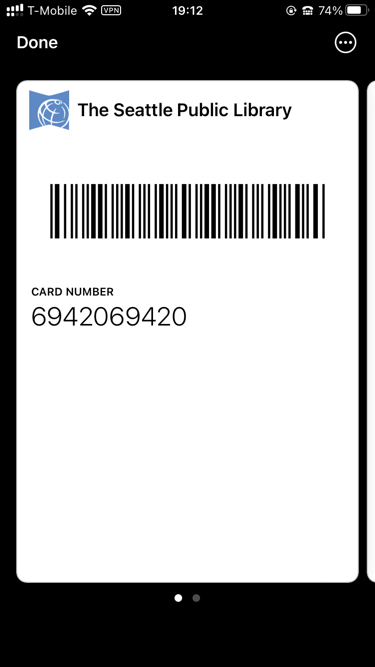
can be achieved by displaying simple PNG image.
The point of applications that can store cards is that they enable use with wireless payment terminals. If I couldn't tap my phone to pay with credit cards, I wouldn't have a reason to put them into the phone.
This is indeed the hard way.
I just used Stocard to scan my library card barcodes. Done.
Stocard app worked for me. Simple and has an Apple Watch app to boot.
I use a shortcut and Siri for things like this:
1. Save the image to Photos, favorite it, and get the name (e.g IMG_2678).
2. Make a shortcut with two actions:
- find All Photos where name is IMG_2678 and is favorite.
- Quick look
I most often use “Siri, share my contact”, which shows a QR code for my contact with my cell and email address. It’s proven handy when I was busy (making drinks) but wanted to give someone my contact. Qrafter is what I use to make QR codes on iOS.
My library card and a lot of other barcoded cards that I use are stored in an app called Key Ring. It works really well.
Google wallet supports barcodes. While technically you can only set up cards for libraries who have gone through the registration program, in practice they pretty much all work interchangably. Downside is you can't change the display name, so if you have more than one nearby library, it can be confusing.
But but but those Yodas on physical cards in King County at least https://imgur.com/a/A2oond2
The part of my article that caught my attention was the non-trivial bash script. I do write these myself from time to time, but when you see them it's always like, gah! [Shield your eyes]
I believe there were or are arbitrary pass generator apps that can slap a logo and various data into a custom pass.
Alternative solutions to barcodes are RFID/NFCs and geofenced authorization.
My trick for doing this for a summer pool pass in Berlin was to take a photo of the QR code on the ticket and just show that to the scanners.
I expected something more like squeezing the cards with NIF lasers (and alchemy) into diamond lattices encoding the information and then hacking it alongside phone storage
I solved this by memorizing my library card number.
Very interesting, thank you!
So wait: you don't want to pay Apple $99 and you don't want to pay for one of the apps that generates a pass for you, but you'll extract the cert from one of those apps thereby piggybacking on another developer's $99 payment to Apple.
That's uncool.
On a slightly related note: a site I login to regularly uses Semantic VIP Access for 2FA. You can convert these to standard TOTP codes so that you can load them into the Apple Keychain or whatever other TOTP program you prefer: