▲ 173 points
back
116 comments
I prefer wigglegrams. If you're looking for an example - Wikipedia page has one from 1927[1]!
Was going to say the same thing. Presenting stereo pairs has a lot of layout and resolution issues to say nothing of the fact that some people have stereo blindness to varying degrees (lazy eye is an extreme case).
The author is correct that stereo depth can greatly enhance an image, but a wigglegram does this at full resolution with no visual puzzle solving.
Thank you! I have not, to this day, have been able to see any Magic Eye/Cross Eyed or similar images. A wigglegram is immediately trivial.
I'd probably most appreciate a layout with one frame on the left, the wigglegram in the middle, and the other frame on the right, so that I can get a sense of both the distances and the detail.
WHAT... this is the first time in my life I have been able to see 3D with one eye!
Closing one eye and I still see the depth effect.
Main brain works very differently than I assumed...
With this effect I guess one could make even people who are blind on one eye see in 3D
I'm slightly suspicious that this comment was written by a bird.
This is very common in structural biology papers, where you need to make figure of complex 3D arrangements of atoms, but the figures must be printed in 2D. Typically using molecular modeling software, you find your view of choice. Then you rotate +- 0.5° and render two images, and put those side by side as a stereo pair figure.
It takes quite a bit of practice to see them well:
https://spdbv.unil.ch/TheMolecularLevel/0Help/StereoView.htm...
Thanks for that! It is quite impressive and I learned to see the 3D molecule on first try.
I remember seeing something similar, but made of an array of dots (you did not know what was behind the doors until you see it by crossing your eyes)
I did this on a school project back in the 90's, with a structure of quinol clathrate that was completely wrong but very pretty. I was very into povray at the time. My chemistry teacher didn't quite know what to make of it...
technically rotation is going to end up giving a slightly different result than lateral displacement, right? but it's very similar for small distances.
Since the advent of models like Depth Anything, you can now convert 2D images into this effect using them plus a bit of creative processing. Here's a non-technical overview that plugs some software and talks about the underlying models: https://www.owl3d.com/blog/2d-to-stereoscopic-3d-with-ai-dep...
Bonus, I also found this real-time 3D-ifier for your screen: https://github.com/zjkhurry/stereopsis-anything
I had to, hopefully you don't mind moultano!
Same content, but all lined up and rendered the whole article in cross-view.
You can now read the article and see the pictures while in cross-view.
https://jasonjmcghee.github.io/you-should-make-cross-views-3...
This is great! I can only imagine how strange it would look to observe someone reading an article this way, but it's a great idea!
Now just need to duplicate the mouse cursor to be in 3D too!
I also had to shrink the window as I couldn't manage the cross view on a widescreen :)
Clever!
If you are able to cross two images for the 3D effect you can also do it to spot differences like a savant in “spot the differences” games.
Give it a try: https://spotthedifference.games/
You’re welcome.
Very relevant: https://news.ycombinator.com/item?id=42655870
It's interesting how the difference appears, a strange artifact. Very fun to feel like a pro clicking through the differences quickly
My mind is blown right now. This is so cool.
When they wrote "your screen can display 3D photos", I thought it would be a hardware hack and not something that depends on a human physiology hack.
Something like stereoscopic GIFs come to mind, e.g. https://tenor.com/fr-CA/view/dain-stereoscopic-daingifs-3d-m...
In other words, taking the two images and swapping them quickly creates the illusion of depth.
Edit:
Looking into it, there's a word for it. Wiggle stereoscopy: https://en.wikipedia.org/wiki/Wiggle_stereoscopy
There's a whole bunch of these over at https://old.reddit.com/r/wigglegrams/ if you want more
A great source for stereo pairs is NOAA's aerial imagery data, consisting of various snapshots along an airplane's trajectory. For example here is a stereo pair of Desecheo Island:
https://cdn.coastalscience.noaa.gov/datasets/aerialphotodb/u...

https://cdn.coastalscience.noaa.gov/datasets/aerialphotodb/u...
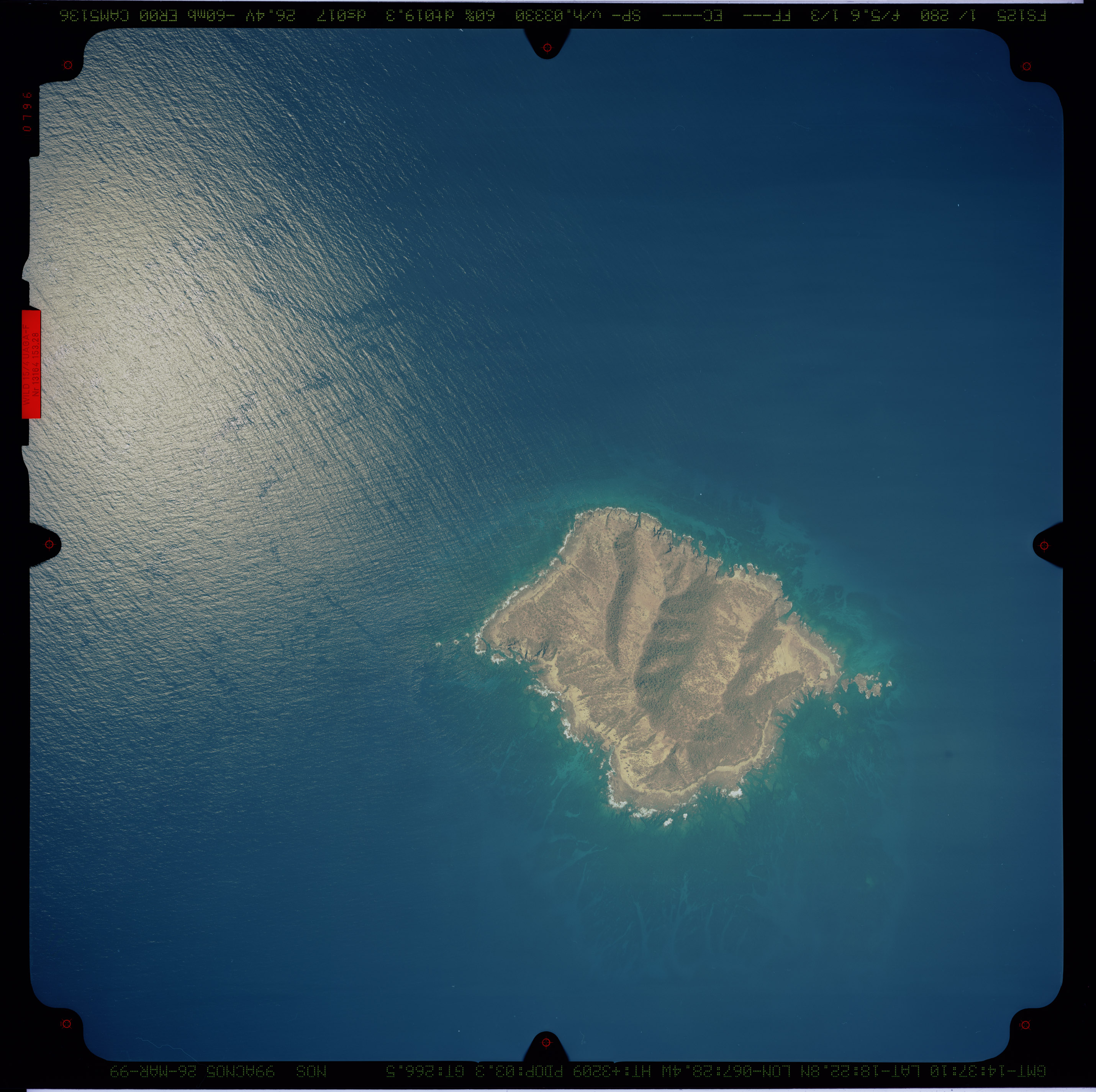
EDIT it can be tedious to discover such pairs. If only there were a tool...
I can generally see the Magic Eye pictures very well.. these are way harder.
The tiny thumbnails at the bottom of the page work, but the larger images I can't cross my eyes enough.
I think it depends greatly on getting the screen/image size just the right size and also getting the viewing distance right. On large monitors it seems harder to see.
I love this effect. I had a book of Magic Eye pictures as a kid, which was a similar effect.
I'm not sure how practical the "crossing your eyes to get 3D" thing actually is, it makes my eyes water after a minute or so, but it's still sort of cool to see my cheapy monitor doing 3D without any special glasses.
I've done this with my SLR. Moving the camera different amounts can give a more pronounced effect, however it can be more difficult to get the image to converge.
I had a lot of fun with doing this 20 years ago. Sadly, my visual acuity has become significantly different between my eyes (even w/ correction) and the enjoyment of 3D displays has really diminished as as result.
Just musing because I'm working and busy:
I wonder how difficult it would be to do video. (Obviously you'd have to shoot two videos in parallel versus just moving the camera and shooting again.)
Converting existing 3D videos to a cross-eyed viewing format would probably be the easiest way to experiment with it. I wonder if anybody has done that. I've never looked at 3D movie formats before. I always assumed it was two interleaved streams.
To simplify capture, I've picked up a couple of digital stereo cameras (Fujifilm FinePix REAL 3D is a good one). The image quality is so-so and they're fairly affordable still on eBay (maybe $200 or so).
Last summer on a road trip to Alaska, it was almost my exclusive camera for the trip. When I got back I wrote an app to take the MPO files it contains and turn them into a printable parallel-view image. The side-by-side images are intended to be printed and used in an old-fashioned stereoscope.
Ugh, there's some people out there who cannot see these. Not for a lack of trying, I've personally been trying since the 90s.
The video game Magic Carpet had a couple of 3D modes, anaglyph 3d requiring blue/red classes, and stereogram mode [1]. The latter was not really usable, but it was a cool trick, expecially for the time ('94).
I found these all very easy to see on my phone screen. By the end of the article I was already able to instantly "go 3d" without thinking "go cross eyed" or use tricks like looking at my nose.
The problem I think most people will have is screen size. If the screen is too big then going cross eyed will be harder and might cause strain. Straight eyed can be easier, but I still think there's a limit on screen size. Magic eyes when printed are about the right size for people's heads so just work.
The second problem is the pictures look half as big as soon as you "go 3d". So although it's very cool and I buy the author's point that some pictures need the depth to make sense, there's always something lost from the full size picture. On my phone it made it like looking at a postage stamp!
Still I might try it myself given how easy it sounds. I imagine even a slight bit of wind would make some subjects impossible, though!
I’ve been able to view these type of pictures forever. But I’ll credit the article with today being the first time I’ve actually taken them myself, put them side by side in my notes app, and been pretty impressed with how simple it was to get a neat effect.
Often underappreciated detail when it comes to stereoscopic 3D is that the image produced is not actually fully 3D still.
Even with just a single eye, it is possible to see depth: this would be via monocular depth cues, such as depth of field.
If you ever wondered why 3D visuals, no matter how technically advanced, never quite felt right, this is likely the culprit. When your eyes adapt to the stereo 3D cues, the monocular cues are lost and vice versa. There are some VR technologies that do hope to achieve both at the same time using eye (and iris?) tracking, but I haven't been following the topic for a while. It's essentially a quest for a lightfield display.
Nintendo 3DS gang rise up! Though it wasn't perfect or useful that much it was still a nice feature, made some fun photos with it.
I’m surprised that phone manufacturers don’t stick cameras on opposite ends of the phone to allow the quick capture of these.
I’d love to look at these pictures but have never succeeded. In particular, I find crossing my eyes to be a rather painful ( as in, it physically hurts ) experience so stop immediately if I try.
Don't do this too much.
Your eyes have to focus. For things close enough they can tell from the required small angle of cross-eyed movement, how to focus.
These pictures (and stereograms) disconnect the focus and angle of your eyes. Do it enough and you loose the ability to focus quickly. I found it out playing with steregrams on a 286 pc a long long time ago.
YMMV but I lost the ability to quickly re-focus object that you dont already know the size of; and it's a bitch.
Once you learn how to cross view, you can cheat at those „find the difference“ quizzes: Cross view them and the differences will flicker.
My favourite related trick is to use cross viewing to solve find-the-difference puzzles.
Set up so the two images (with slight differences) are next to each other, cross your eyes, and look for 'shimmering' spots - these are the differences between the images.
It makes differences very easy to spot, which is pretty cool!
I love that this comes up every so often on hacker news. I used love Magic Eye as a kid, and have been taking stereo photos on and off ever since. Experimenting with how to take them (moving camera, from a plane, etc), and how to view them (cross view, and putting them into Meta Quest).
Thanks for sharing!
Those who fail to cross eye/parallel eye these images can try looking at these through a (DIY) binocular (empty pipes/used kitchen roll should work the same).
It will only work with parallel eye images though (at the end of this article).
most stereograms are designed to look correct when you cross your eyes
This one looks weird when I look at it cross eyed, but fine when I look at the other way.
https://moultano.wordpress.com/wp-content/uploads/2025/02/17...

january 1983 issue of Creative Computing had an article on stereo vision, and I build the stereoscope in it, and wrote basic for my IBM PC to do this. Awesome!
https://www.atarimagazines.com/creative/v9n1/162_Stereo_grap...
What I find funny is that once you get the fix, you can move your eyes around the 3D picture without losing the fix
> Your screen can display 3D photos.
That's a stretch, but I guess clickbait is required to get engagement nowadays.
I want to know why cannot the multiple cameras on my phone be used to create 3D images.
Is there a way to turn Apple special photos into cross view images?
Jokes on you! I can only see from one eye at a time!
I thought this would be about wigglegrams
Is it just me or do they have some of the left/right images swapped?