▲ 635 points
back
307 comments
Putting on my user hat...
"OK. Signal has forward secrecy. So messages are gone after I receive them. Great!"
Oh, you didn't turn on disappearing messages? Oh, right, then forensic tools like Cellebrite can get them. You have to turn on disappearing messages. The default is off.
Oh, you did turn on disappearing messages? We send the messages in notifications. So the OS can keep them. Turns out Apple was doing that. There is an option you can turn on to prevent that. It is off by default.
"I'll just delete the entire app!" No, sorry, the OS still has your messages...
At what point does the usability get so bad that we can blame the messaging system?
This same app had a usability issue that turned into a security issue just last year:
End to End Encrypted Messaging in the News: An Editorial Usability Case Study (my article)
I think one of the main issues is that end-to-end message encryption is a sham as long as backups are not encrypted. I could have good device security, but if the person I'm talking to does not use ADP, iMessage and WhatsApp messages get backed up with only at-rest encryption (I think Signal opts out of standard iOS backups) and possibly the same for backups of the iPhone notification database (which the article suggests as a possibility).
Similarly on Android, WhatsApp suggests unencrypted backups to Google Drive by default.
Putting on my tinfoil hat, I am pretty sure that Google/Apple/Meta have some deal (successor to PRISM) where end-to-end encrypted messaging is tolerated as long as they have defaults that make it possible to access chats anyway. Apple not enabling ADP by default and WhatsApp doing Google Drive backups that are not end-to-end encrypted is the implementation. Since most people just use the defaults, it undermines security of people who care.
It's a 'win-win', the tech companies can wash their hands in innocence, the agencies get access to data, and phone users believe that they are chatting in a secure/private manner.
People keep pushing signal because it is supposedly secure. But it runs on platforms that are so complex with so much eco system garbage that there is no way know even within a low percentage of confidence if you've done everything required to ensure you are communicating just with the person you think you are. There could be listeners at just about every layer and that is still without looking at the meta-data angle which is just as important (who communicated with who and when, and possibly from where).
The median user isn't going to change default settings, so your app is as secure as whatever the default it.
> Oh, you did turn on disappearing messages? We send the messages in notifications. So the OS can keep them.
Worse than that, they did not take advantage of the ability to send that message data as an encrypted payload inside the notification.
https://blog.davidlibeau.fr/push-notifications-are-a-privacy...
Either do not include sensitive user data inside a notification by default, or encrypt that data before you send it to the notification server.
We send the messages in notifications. So the OS can keep them. Turns out Apple was doing that. There is an option you can turn on to prevent that. It is off by default.
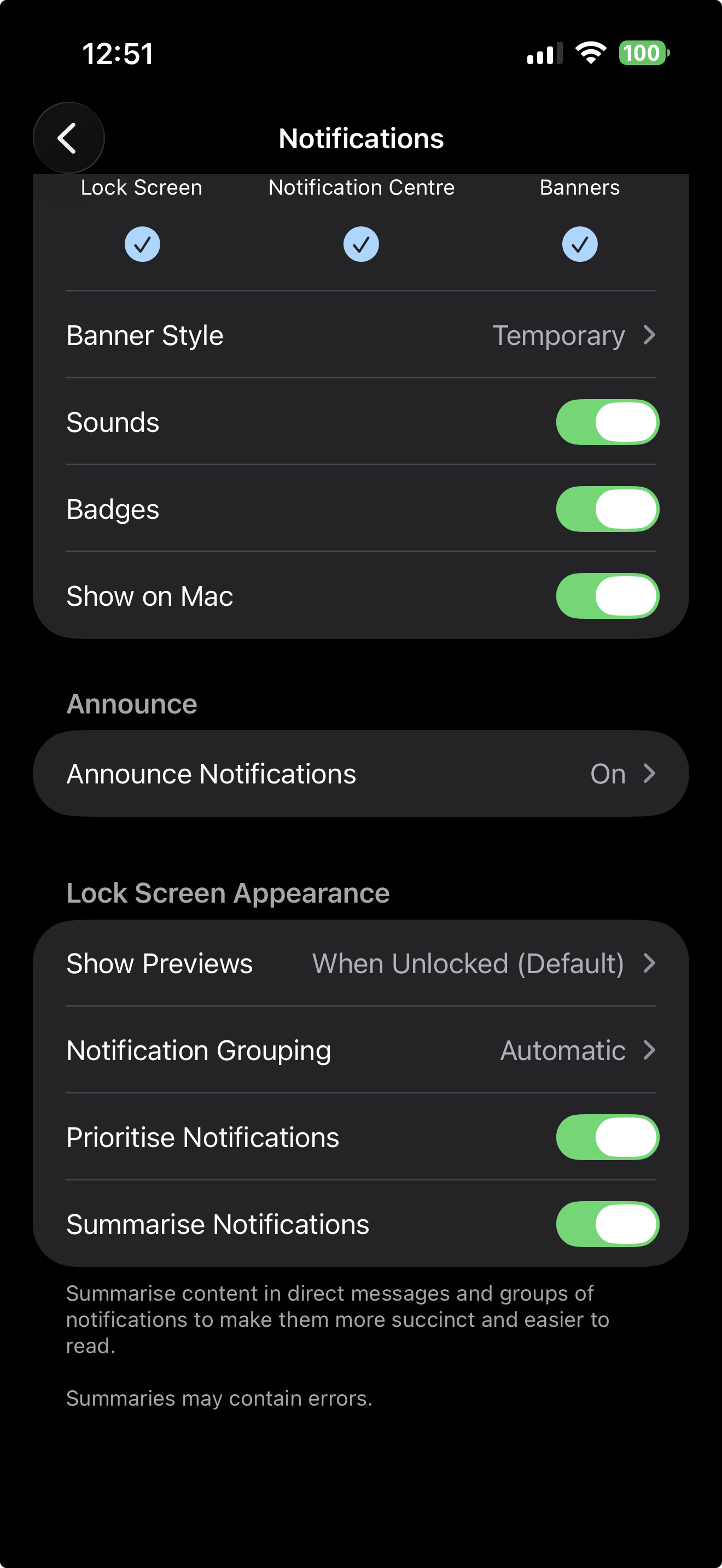
At least on my iPhone the default is to preview messages only when unlocked [0]. This user went out of their way to show previews in a locked state which meant it was vulnerable by digital acquisition without unlock code.
Use SimpleX if you really want a secure messenger. Endorsed by Whonix, which in endorsed by Snowden.
If the encryption security isn’t a freaking pain in every ass in the Tri county area, it’s not secure.
That’s been my go-to and I’ve yet to see it not work.
0) send a public key. 1) encrypt the file with your private key 2) send file.
WTF. This is super simple stuff.
Settings > Notifications > Notification Content > Show: "Name Only" or "No Name or Content"
I've had this enabled to prevent sensitive messages from appearing in full whilst showing someone something on my phone, but I guess this is an added benefit as well.
Just to clarify, this is within the Signal app settings—not the OS (iOS or Android) system settings.
Critical distinction, as merely changing OS notification settings will simply prevent notification content from being displayed on-screen.
First, a critical setting for Signal users:
"Signal’s settings include an option that prevents the actual message content from being previewed in notifications. However, it appears the defendant did not have that setting enabled, which, in turn, seemingly allowed the system to store the content in the database."
Second, how can I see this notification history?
Just curious, how come at least once a month signal bugs me to turn on notifications? I said no for a reason, every single time - why does it keep asking?
Not implying anything evil but it feels a bit weird esp after this.
> testimony in a recent trial
Court cases are the real way to audit security.
Larping about security and complaining about companies responding to court orders only gets you so far. Its way more useful to look at what actually happens in reality.
I wonder why Apple doesn't 'just' delete the notification data associated with the app from the internal database when the user deletes the app? It seems like asking for problems to just keep old notification content around forever.
Original article: FBI Extracts Suspect’s Deleted Signal Messages Saved in iPhone Notification Database[0]
0. https://www.404media.co/fbi-extracts-suspects-deleted-signal...
"However, it appears the defendant did not have that setting enabled, which, in turn, seemingly allowed the system to store the content in the database."
"[A]llowing the system to store the content in the database" where a third party, such as Apple or a government, can access it is the default
Only a small minority of users know about settings and how to change them. The vast majority of users do not change default settings. Apple knows this
Was this not a known issue (in terms of trade-offs) for years? I recall discussion back in 2018 at least that made mention of this concern.
https://github.com/RealityNet/iOS-Forensics-References https://theforensicscooter.com/2021/10/03/ios-knowledgec-db-...
So this is where we find out the one end of e2e is the phone and not the app.
Semi-related, in whatsapp reading the text in the notification doesn't mark the message as read, so the OS is kinda mitm here.
Also discussed yesterday, in https://news.ycombinator.com/item?id=47703573
On Android, when I use WhatsApp and have notifications for groups turned off, I can still see that they arrive briefly and then get removed (the icon top left vanishes). I wonder often, if this is a way to push all group message content into an unencrypted data trace as well - for the same use case.
While it's definitely surprising that the OS caches this data after the notifications have been swiped away, I always thought that notifications are an obvious hole in the whole E2E encryption setup.
So Signal is sending the notifications through Apple's ecosystem somehow, presumably to save battery life by not having a persistent connection to Signal's servers? That's what I think happens on Android, too. When I had Lineage years ago, I had a persistent connection to Signal as the notifications didn't come through Google. Unfortunately there was a persistent notification for the persistent connection with no way to remove it.
After these news Signal should ask the users ASAP and on new installs something like:
> Do you want the notifications to pass through Apple (no privacy, better battery) or through Signal itself (better privacy, but less battery life due to the persistent connection to Signal's servers.
It should be as part of the setup wizard, not inside the settings.
Correct me if I've misunderstood something.
Aren’t notifications supposed to be encrypted for Signal?
It would be great if each Signal group/contact had the setting: "Name Only" or "No Name or Content";
That way, you could disable this only for "non-sensitive" groups / contacts...
How convenient that Apple can turn a blind eye to this, and maintain their useful fiction that they don’t provide law enforcement backdoors.
Privacy, that’s Apple: https://www.reuters.com/article/world/exclusive-apple-droppe...
This is the same issue that got a local drug organization busted some time ago - their entire α-PVP cooking operation was busted after one of the gang members was caught during a sale, his iphone was confiscated and the entire org was right there in the notification history.
I guess that's what you deserve if you trust apple with your operational security.
Perhaps a stupid question, but why do notifications need to be stored in a database in persistent storage at all?
OK, maybe they can be stored until they're dismissed in case the battery suddenly dies, so they can be displayed again on next boot and are not lost, but it sounds like they are being stored long after they are dismissed.
This is one of those cases where the "secure app" narrative collides with how messy real systems actually are
There needs to be a bit more "group chat" control in Signal messages, wherein you could enforce certain settings for certain chats regardless of the phone settings. You could have group chats that would enforce not showing more information in the notifications, while others would still allow it.
I thought Signal didn’t show message previews by default and you had to go in and enable it? I’ve never had message previews in my Signal and I don’t remember changing anything. Maybe when they introduced the feature, you could pick but they strongly suggested it not showing?
As an aside, I decrypted an encrypted iPhone backup using a tool from GitHub because I wanted easy access to my Voice Memo recordings.
Photos I had long deleted were still in the backup! It's quite surprising just how much is being stored by the phone.
[dupe] Discussion on source: https://news.ycombinator.com/item?id=47703573
I don’t know why anyone trusts Signal. People keep talking about them. I thought it was clear years ago that they were a sketchy company
Probably stupid question: why won't they e2e-encrypt push notifications too? The vector is obvious and has been open since forever.
There is no such thing as strong end to end encryption on a proprietary operating system no one but the provider can verify.
We are running out of Murphy's laws for digital communications. People will go back to physical messaging
People also got charges in the same case for removing people from a Signal chat
Is there a way to delete all Apple notification history from Apple’s servers?
Sounds like an intentional government feature. Just speculation though. I'm glad I have a Pixel, but I'm on the default OS and need to switch to GrapiousOS (secure version). Just haven't due to lack of nice Google features.
A lot of dumb criminals seem to carry smart phones. The irony.
Terrorism charges. That’s what we should be talking about.
Hmmm this is interesting. Because I've long had the complaint that notifications are frustratingly ephemeral. There have been many cases where I've gotten a notification that my phone clearly has but which I can't read, because when I tap it, it's purged permanently, and then I have a spotty internet connection, so I can't see it in the actual app that loaded.
I'm always like "JFC, can't you cache the notifications, so I can see it there while waiting for the app to gets its act together?" But no, that's never an option.
So I'm getting a laugh out of how notifications last long enough to be extracted by someone just not the person that they're for. (Though to be fair, it could be a case of a notification that was never tapped, and therefore hadn't been purged yet. I couldn't tell from the story.)
People who NEED to hide their notifications from iOS have this already disabled.
They rest who "evaluate their threat models" can practice Spy-life-gymnastics by disabling it from Signal.
iOS Data Protection — The Four Classes
Data Protection is implemented by constructing and managing a hierarchy of keys, building on the hardware encryption technologies built into Apple devices. It's controlled on a per-file basis by assigning each file to a class; accessibility is determined by whether the class keys have been unlocked.
The four protection classes, from strongest to weakest:
NSFileProtectionComplete — Files are only accessible when the device is unlocked.
NSFileProtectionCompleteUnlessOpen — A file can only be opened when the device is unlocked, but is not closed when the device is locked — it's encrypted when the last open handle is closed. Suitable for data being uploaded in the background.
NSFileProtectionCompleteUntilFirstUserAuthentication — The resource cannot be accessed until after the device has booted. After the user unlocks the device for the first time, the app can access the resource and continue to do so even if the user subsequently locks the device. Fortify This is commonly called AFU (After First Unlock). This is the default class for all third-party app data not otherwise assigned to a Data Protection class.
NSFileProtectionNone — The resource has no special protections. It can be read or written at any time. The encryption only uses a key derived from the device's UID.
The BFU/AFU Distinction — The Heart of the Signal Issue
Apple's iOS devices operate in two key security states that directly impact data accessibility: Before First Unlock (BFU) and After First Unlock (AFU).
When an iPhone is in the BFU state, it has been powered on or rebooted but not yet unlocked with a passcode. In this state, the Secure Enclave does not release the decryption keys needed to access most user data.
Once you've unlocked once (AFU), files protected with NSFileProtectionCompleteUntilFirstUserAuthentication become accessible, the Keychain is available, and background processes and apps can access encrypted content as needed.
The Signal notification content issue connects here because notification data (including previews) stored in the default CompleteUntilFirstUserAuthentication class remains decryptable by any process — including OS-level forensic tools — as long as the phone has been unlocked at least once since the last reboot.
... and I thought I'm turning off notifications for all apps just so I don't get spammed. Looks like the setting is more useful than that.
Reminder that no end-to-end encryption arrangement can do anything before encryption, or after decryption, at the endpoints.
If I have access to the UI, I don't need to break your encryption.
Um. Android has notification history also and I see no similar ability to hide notification content from the system ...