▲ 208 points
back
112 comments
These are the type of problems that are completely invisible to someone who doesn't experience it. I wouldn't have even known it was a problem to solve.
A few years back we played an escape room game online with the whole team. One of the clues was in one of my colleagues "room". All he had to do was read it. "Come one read it man, we can win this." He froze. We all insisted he reads it. He could not read it. We thought he had an internet connection issue. Somehow we managed to escape the room and kept going.
The next day he told me he was embarrassed because he couldn't understand what we were talking about. He could not see the note we were talking about because he is colorblind.
> He could not see the note we were talking about because he is colorblind.
A similar thing happened to a friend who was over for game night. We were playing the Monopoly Deal card game when he put a brown and a red card next to each other with kind of a confused silence. Look at this:
https://static.wixstatic.com/media/374991_dc4dfa2a6f0d4ebb81...
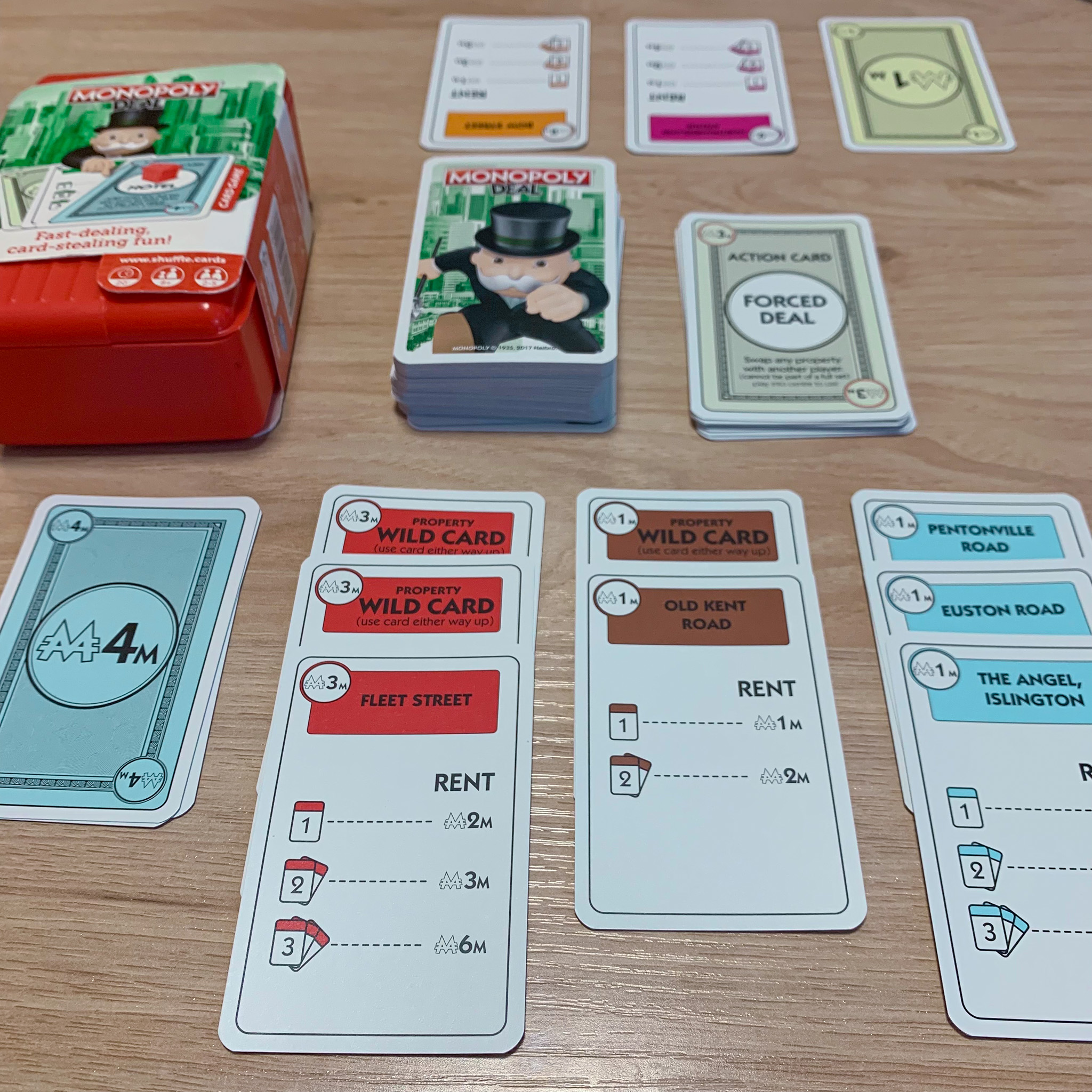
(Pictured: Three red property cards next to two brown property cards.) They use only color to indicate property group. I was surprised that such a recognizable brand would allow this to get through. About one in twelve men cannot play this game without assistance.
I’m colorblind and the weird thing is that it’s somewhat unpredictable when I will not see things. It’s not so simple as “can’t read red on green”. Shading and lighting matter enormously. An orange frisbee is harder to find in grass then a red one.
The strange thing is that I somehow convinced myself that I wasn’t colorblind during my childhood, in spite of obvious evidence, because I often could figure out colors. Then during an eye exam at 19 years old I failed 11/12 vision tests.
I always offer to drive because otherwise I'll surely make myself sick by browsing on my phone for something. Even if just conversing with the driver since almost all conversations end up with me inevitably looking something up on my phone.
Being colorblind and having motion sickness are totally different things. One cannot get over being colorblind. It can never go away. Motion sickness (99% of cases) can be managed. Exposure therapy works. Look at every navy ship. They start the voyage with half the crew seasick. But after a few months it practically disappears.
One interesting stat from the miltary: cadets who were competative swimmers generally dont get motion sickness. The combination of 0g floating and constant head rotations along diferent axis (flip turns) normalizes the sensations.
I have no idea how something like this is ideated, then prototyped, then validated, but it does work wonders for me, and I am so grateful it exists.
Seems pretty straightforward.
1. Be a developer and you (or a spouse/child/friend) get motion sickness when looking at the phone while travelling.
2. We’ve known the mechanisms of motion sickness (looking at something static while your inner ear indicates you’re moving) from before smartphones were a thing.
3. We already have a ton of information on the phone to know when we’re in a vehicle, how fast we’re moving, direction, so on.
4. Try adding something to the static screen so it moves in tandem with you and thus reduce the cause of motion sickness.
5. Get the people who get sick to try it out.
If anything, I’m surprised it took a decade and a half to come up with it.
I just found out this capability is also available on Macbooks!
This would have saved me a lot of grief during a recent road trip through some mountains.
https://support.apple.com/guide/mac-help/change-motion-setti...
It works great on Macbook. I don't know why they don't suggest it to folks when car or train movement is detected! I have a feeling a lot of people don't know it exists.
I wish my Pixel 9 had it but I guess it hasn't trickled down yet. I think it's in the latest Android on latest Pixel devices though.
Thank you so much for sharing this. I’ve been saying to my wife for about a year now that I wish MacBooks had the motion cues feature… turns out I just needed to search for it!
Very cool that apple made it
I wonder if any other laptops have IMUs that can be used to implement this on Linux/Windows
this helped me tremendously when I had to work in the backseat of a moving car. Felt sick pretty quick when I started using the laptop until I remembered about this feature because someone on HN recently posted / commented about it
There is a nice little app that does this on Android available on F-droid:
I tried this and it did nothing for me. For a start, the white dots disappear on a white background, so not a good start. The main thing, though, is while it picked up on the vehicle turning it didn't pick up on acceleration much, which is what actually gives me motion sickness.
There was a discussion about this a few weeks ago, where I discovered KineStop which is an app that does the same on Android. I've only tried it a few times but it has worked every time.
Worth checking first whether your phone already has this natively. My one year old Android by Honor has it built in and exposed in the quick settings (sliding the right down). I know a couple others also have it, but not all of them as discoverable
I use KineStop and it works better than Apple's version on iOS did for me. Hopefully AOSP implements one because you do have to give KineStop rather invasive permissions.
Eventually I will try the open source offerings.
Motion sickness person here. iPhone’s stock one doesn’t work for me. Haven’t tried that on Android. Will see if something similar is available on iOS as third party app.
A related post from last month: https://news.ycombinator.com/item?id=48557530
Sharing this here in case anyone wants to check out the discussion there and see how it looks in the Verge's short review.
My Android phone has this too (Vivo). Maybe they all do?
It wasn't well explained what it was for though, I discovered it while messing with the settings and thought it was just a cool random feature to visualize motion. I'm just now learning it's for motion sickness.
Honor phones have this in the quick settings (the thing that opens when you slide the right side of the top bar down), labeled "Motion Sickness". Felt well-explained and discoverable.
But the beauty and pain of Android is every brand having slightly different UI. This might well be a manufacturer-specific feature. Or maybe it's a common Android thing that some brands just expose better than others
This should've been possible with the Thinkpad HDAPS accelerometer back in the day. (If it detected the laptop was falling, it would park the HDD heads in anticipation of impact.) Shame nobody thought of it then!
This feature has helped me so much since i found it. I have kinda bad motion sickness and this has really helped me
The question I have is whether a phone with motion cues causes less nausea than no phone at all in a window-less boat.
This is an easy enable with "Automatic Detection". Are there any other phone "Accessibility" options that are useful to everyone?
This has been reposted here several times in the last few weeks, but it is a very neat feature. I find myself getting quite motion sick on the bus if I look at my phone, but these dots help me at least check messages here and there without immediately feeling like I'm going to throw up.
I'm curious how this feature chooses to turn itself on with automatic detection.
Somehow managed to fool it the other day by shutting a car trunk, helping someone load up, with me on the outside. It activated the dots for the rest of my walk afterwards, when I was using the phone.
I get the impression there are much more sophisticated signals and classification methods to determine whether someone is in a vehicle or not, beyond the accelerometers.
Is this related to roll and pitch motion in sea sickness where by knowing the horizon and direction of travel can help?
I have been too nervous to really try using the phone as a passenger in a car, but it has also activated for me on trains and planes, where I suffer less from motion sickness anyway.
Not enough experience yet to say for sure whether they work, but the dots look so cool that I will keep it on regardless.
I use this a lot on my MacBook Air when working in cabs. It’s beautiful and works well for me
One of the best and most clever "hidden" features. Very Apple.
I never get nauseous looking at my phone in an Uber anymore. My wife can barely handle looking at a screen in a car and this feature allows her to work with no issue.
I like the "bubbling" dots effect that occurs in an airplane when making a turn. Anyone know the reason?
I guess they're moving in the opposite direction of the turn to force the perception of turning.
Wonder if Tesla should add something like this to rear screen. It’s not very useful for most adults due to how low it is, but kids willing to get screen time on anything (not that I condone).
I was so skeptical of this feature, now I cannot live without this.
I wish this worked a little better. It doesn't solve motion sickness for me when looking at my phone in a car, but it does seem to make it a little less severe.
In case you have a problem with the iPhone performance, make sure inside settings disable `Dynamic` pattern for this feature.
iPhone 12 Pro (26.5.2)
Once this was announced a few years back, I was very skeptical that a few dots on the screen would be all that's needed to help me.
And yet, apparently it was.
It's not perfect, but the dots help me to go from instantly feeling sick to lasting 30-40 minutes before I have to stop looking at the screen.
Would it also work onboard a ship? Or movements are too slow to provide enough visual cues on a small screen.
Works surprisingly well, had a super sensitive passenger in the car the other day and zero signs of nausea.
How about VR glasses? Could similar approach help there?
It's pretty cool but it does hog CPU a bit.
Saw someone using this on the train, looked cool
Any reason this doesn’t work in CarPlay?
Another super useful feature is Accessibility > Zoom > Use keyboard shortcuts.
The you can use Command+Option+Plus and Command+Option+Minus to zoom the entire screen.
It’s a great way to zoom in on anything regardless of whether an app supports it or not. Sometimes I help family members remotely and look through a bad camera at a document on their side, and applying this zoom makes the difference between being able to decipher the content and not.
n=1, but it works great for me!
I think this is a good example of how Apple is doing well in the application of AI and also uncharacteristically doing poorly in the application of AI.
Doing well as it quietly is coming up with helpful product updates like this which are buried in support docs and limited splash.
I kind of prefer this more quiet usage of application of AI.
Can you play back virtual time shifted vehicle motion cues, to make yourself barf on demand? This could be a godsend for bulemics. Accessibility at its finest.