▲ 668 points
back
596 comments
My gaming PC that I built in January 2006 that IIRC I used to simultaneously run Battlefield 2, Trillian, Xfire, Thunderbird, and Winamp with a 1680x1050 monitor had 1 GB of total system RAM.
That's because programmers in 2006 didn't understand programming. They didn't understand how to make their software better.
Real programming means writing your own javascript glue, pulling in hundreds of supply-chain-compromised js libraries that you never inspect or profile, and running the whole thing in a browser engine, while making sure to store all state in the cloud.
The modern breed of programmers who don't understand programming have switched from C and C++ to Rust and Go, so they're on the right track of using more resources to improve the developer and user experience, but they haven't gone nearly far enough. They still do dumb things like write efficient code, and profile and put effort into reducing binary and resident size. They should trust in javascript and the browser and the internet, like all good programmers do.
Zig programmers have completely lost the plot. They're of the type that tries to write "hello, world" manually rather than pulling in a third party library so they can efficiently call helloWorld(). Writing single-binary apps that fit on a floppy? Who even cares? What even is a floppy? How do they call themselves programmers without css and advertising telemetry?
Some of us still know how to write software like that. And enjoy doing it.
I made a little conference schedule app a few weeks ago for a conference I was at. I used my own rust UI toolkit, which calls in to cocoa to make use of native UI components. The resulting binary is about 500kb and it uses a couple megs of ram while running. It looks and feels like a totally native iOS app. As far as the OS is concerned, it is.
Even 500kb feels too big for what it is. I’m rewriting the core at the moment, and I think it’ll be more efficient as a result. But I’m still pretty happy with it.
2 years ago I stated that we should stop worrying about software consuming a lot of ram.
I had just built my pc with 128gb of ddr5 ram spending less than an average android phone (I think like $300).
I would like to retract that statement. Thanks.
Fun fact, one of the XFire cofounders won Carmack's Ferrari at a Quake Tourney:
https://en.wikipedia.org/wiki/Dennis_Fong#/media/File:John_C...
,_May_1997.jpg)
I remember within the last decade noting that minesweeper from the windows store took more space than a pretty damn healthy Win98SE install (with minesweeper)...
I was replaying Xenoblade Chronicles on my Switch 2 and the whole time I was thinking about how this ENORMOUS, open world game originated on the Nintendo Wii, a console with only 88 MB of RAM.
I just set up a web server for a hobby project on a $10 Dell PC that has 2GB of RAM welded to the board. After booting Debian 13 it still has 1.6GB of free RAM.
In fact, that seems a lot. Back in ~1996 I was running one of the EFnet servers on a Compaq with 8MB of RAM.
I still miss Battlefield 2. There is really nothing like it today, not even close. The dynamics with squads and a commander and A+ physics and overall game balance remain unmatched for all FPS games.
Fortnite, PUBG, COD, all are disgraceful in comparison.
Before I built a gaming computer circa 2004 I daily drove my family's old beige box that had a 350Mhz Pentium II with 64MB of RAM and Windows 98. I remember running CDex (because ripping CDs was all the rage), Trillian, and ZDaemon all at the same time without a hiccup. What a time to be alive!
Putting aside the fact that it is horribly bloated. Accurately measuring RAM usage is tricky, there are several measurements, and no "right" one.
It is clear from the article that what eats up so much RAM is not the weather app itself but the framework it runs on. There is a "Renderer", a "GPU Process",... eating most of it.
The thing that the task manager doesn't tell you is whether or not these are shared components. It may be that the 662 MB used by the "Renderer" is shared between many Windows components, so killing that Weather app may not reclaim as much space as you may hope, instead, it would require killing every user of the component, some may be core system apps.
In addition to the distinction between private and shared memory, there is also the distinction between actual RAM usage and and virtual memory. It is possible for a process to memory map a 100 GB file. If you look at the address space, it will take 100 GB more of virtual memory, even though it may be actually zero physical RAM, but it is not always zero either, the parts of the file that are currently accessed take up some space, which may later be reclaimed by the OS by committing the page to disk.
Even the most obvious "I do a big malloc()" kind of memory use is not that obvious, the OS can overcommit, put stuff into swap, use memory compression, etc... And it can do that even if the system is not overloaded, as to make more space for the disk cache for instance.
So seeing "1 GB" in the task manager is just a vague hint of how it may affect performance. And not all "task manager" tools give the same value for the same program (so Windows vs Mac may be misleading). "Process Explorer", a more advanced version of the Windows task manager can give a lot more details, with different values of memory usage depending on what you are looking at.
Easy workaround for this:
1. Install uBlock Origin in Edge.
2. Start Edge, browse to MSN Weather.
3. Click the "Add an Application" button in the address bar to get a Start Menu icon for the page.
4. Delete the in-box Weather app icon.
Now you get the same Weather app in about 130MB of RAM, with no ads. It's not as nice as a native app, of course, but it's 1000% better than the useless ads and MSN feed that you can't block from the built-in Weather icon.
(Also, go into Widget settings and turn off "Discover / Microsoft Start feed". Same crap, different surface. Get rid of it.)
As embedded guy, sometime i wonder what those web devs are doing. A simple app that consumes multiple magnitude more RAM than the entire system i usually working with(~1MB). I assume it just does some HTTP query and render it on the screen, why the heck 1GB of RAM ?
They're pointing to macOS and saying it uses 5 times less RAM there, but is 230MB for a weather app really something to be proud off?
This took me down a rabbit whole. Why can a simple single purpose app not be just a couple megabytes if not less? The popular options are electron 100MB+, or embedding python3 in your executable which is at least 40MB.
But if you build it natively, you should have all of Microsoft tools at your disposition, dlls and such. In theory, this should allow you to make a 1 mb app or less. But in practice, it's the worse option.
As time goes on, I become more and more convinced that OSes need some sort of OS level GC pool which all GCed languages play in rather than having the language runtime provide the GC.
A major part of why these sort of simple applications are taking gbs of memory is because the GC wants to simply grow as much as it can to avoid pauses/jank. There might be 10% of the memory which is actually live in that 1gb. But because it allocates fast enough, the extra headroom is needed.
Even if it isn't the case that the GC is universal, having a shared GC amongst runtimes would be a boon in general. If I have 3 JVMs running, I might give them all 1gb of memory even though really each of them only needs 200mb to get their job done. The extra headroom is for when a burst happens. If I could combine all 3 into 1, I could save a lot of allocation overhead and general memory.
This does sort of exist in java (war deployments), but there are limitations that make it unappealing. For example, each of the JVMs have to be the same version.
And it also ads on it.
Really Microsoft? Do you really need all the ads revenue from the weather app?
What’s next? Ads on the start menu?
All the comments excusing the RAM usage "because high-resolution screens require pixels" are missing the fact that there's this thing called GPU memory. Which is where pixels data should be. There's no way you need to store fullscreen 4K images for a weather app on anything else than the GPU: use scalable icons, render them on the GPU. No need to use actual RAM: the GPUs have had their own RAM since times immemorial and GPU rendering is a thing too.
What's worse is that the previous version of the same Weather app was fully native on Windows 10. Why would you take a perfectly working app and downgrade it like this?
> By comparison, Apple's native Weather app on macOS reportedly uses less than 250 MB of RAM
That's also bloated, couldn't they find a better comparison to illustrate the egregious waste?
I checked this on my computers:
On Windows 10 the Weather application uses 2-4MB when not active, which climbs to around 490-550MB when active. On Windows 11 the Weather application doesn't appear to be running at all when not active and it climbs to about 540MB when active.
No where near the results presented in the article, however:
The amount of memory used could vary by region and provider used to get the weather data, so in my region it would only use half a gig, in the USA it could use a lot more.
Half a gig is still too much for a Weather application to use, even with all the images and animations that it has I would estimate it only needs to be half as big at most.
I'm puzzled by why Microsoft made this into a Web based application since they could have written something much more efficient with native code, it's not as if they needed to target multiple different operating systems, just Windows and now just a single version of it.
This article seems to be underestimating how much RAM a weather app should take. A well thought-out, native Weather app wouldn't take more than 100 mb of RAM.
It's just msn weather page. Can't they use one single browser for all their apps instead of one per app?
After seeing https://news.ycombinator.com/item?id=49226923 show up here, I'm now hoping someone will vibe-code a nearly identical-looking native app that takes a few orders of magnitude less RAM.
Personally I just use my government's website when I need to check the forecast.
Yesterday I was running :
NixOS, mango window manager, 5 instances of ghostty, 2 of those running fresh terminal editor, firefox with 5 tabs and I was at 2.37gb of RAM.
Please, Microsoft, PLEASE ! You can do BETTER ! Stop acting like an internship for every single feature you add ! Where's the money going ?
It will be interesting to see whether OS and application developers start to face commercial pressure to debloat their applications.
For operating systems and their bundled applications, Apple's integration is an advantage here; the OS designers work for the hardware company and have aligned incentives. That doesn't mean they necessarily align with their customers, just that they are internally aligned.
Microsoft...do they even care about the snappiness of Windows desktops any more?
That’s pretty amazing, credit to Microsoft. Modern-day weather models are pretty complex and running these kinds of simulations can be pretty demanding.
I would like to be assured that the author knows the difference between actual memory and setting aside paging space.
The memory isn't even the worst part, on my laptop it takes up to 30% of the 8 core 4 GHZ CPU. Anytime I'm browsing and my fans start blowing like a lawnmower, it's because I forgot to close my weather app and it's just blasting away at the processor. Doing what, I don't know... probably spyware in one of the insurance ads on the side?
RAM consumption has gotten crazy over the past couple of years. Consumers need to start calling software devs out for this, especially when there's such a severe shortage of RAM.
I think we have to translate '1GB' here. It sounds like so little since it is just one GB, when in fact it is 8,000,000,000 bits.
When was the last time you counted to eight billion and thought it would be a good idea to build an app that would require that many bits of information to tell someone the weather forecast for the next week?
And this comparison is somewhat unfair since all numbers from 0 to 8 billion can be represented with just 33 bits...
Why does everything turn into a browser
This reminds me of the JetBrains Toolbox App, which is a tray/system utility used to keep IDE:s up-to-date and provide a good location to launch them from. Not much more than that. https://www.jetbrains.com/toolbox-app/
It is currently using 680 MiB RAM on Mac OS 26.6, this is more than Microsoft Teams is using on my system. How do a group of what should be a competent programmers with access to good tools even manage to bloat this up so much?
Apple Weather app can jump to 1GB on a mac if you click around a little with the wind gust direction particle effect in the map
Shame, because it's genuinely a great map - ahem, optimizations aside.
I remember giving the app a second chance - after assuming it to be bloatware next to all the other default apps that came with Windows - but after seeing it redeem itself in benchmarks[1], I gave it a shot and quite like it. The iOS app was too rubbish to bother with, though.
I'm curious what could options there are for decent predictions. Especially with Dark Sky never having been much of an option for Europe. I see some of the people behind it have a new subscription-based iOS app to try, though: https://acmeweather.com/app.
Do people have any desktop weather apps that strike a nice balance between decent code and actually useful predictions? Future weather's likely to be anything but boring, unfortunately.
Remember the days when we complained about Java being a resource hog?
Now I am glad to get a Java or dotnet app.
I don't want to "akshually" this, but on a stock[1] up-to-date Windows 11 x64 25H2 (aka: my desktop) Weather takes up around ~670MB of RAM at launch, not 1GB. While writing this comment it dropped to 450MB. All in all much lower than 1GB.
1: i.e.: not "debloated" or running a bunch of random customizer scripts.
I wonder if this is a fair calculation including the fact that multiple WebView apps should be sharing the same libraries in memory.
If you pay 0.5-1GB to load the edge/chromium libraries but that memory is amortized over N different apps the user is likely to run, then the ”1GB for the weather app” is an unlikely worst case.
Thanks, React and friends.
For comparison, the GNOME Weather app takes 80MB.
I still run Windows 10 on my PC, and one night I spend about 3 hours with ChatGPT turning off all of the bullshit telemetry and other nonsense that Windows runs in the background. Total was about 2.5 GB of RAM, roughly.
Why is Windows like this? One would think the at the company whose value proposition is, allegedly, "optimize your productivity" would not do things like this with their operating system. When this PC dies, and I figure I've got a long while left given my penchant for refusing to spend money on computer hardware, I will not be booting a Windows system again. What a mess.
Reminds me this https://waspdev.com/static/images/2025-11-04/bloat.webp
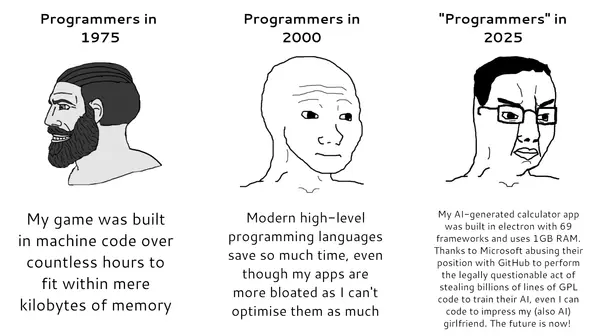
This is what happens when you start a separate instance of Chromium everywhere.
Anything above 50MB RAM for this is shameful imo and reflect poor engineering.
In Windows group there used to be a review where you had to tell the board why the module you try to merge into main branch moved the baseline up by 100KiB.
Meanwhile I’m running Waydroid with Android 13 – _an entire operating system, with apps, running services, etc_ – on my laptop, in roughly that same memory footprint.
Where did it all go wrong? To think I really liked Windows 10 when it first came out, and thought it was a solid direction forward into modernising Windows.
Anytime I go on the website, my fan start going crazy. But it is a good website with the most accurate forecasts, I feel.
Another annoyance is that tree planting initiative, I was able to plant like 10 trees, now they made it very difficult to be able to do 1 in a year. Microsoft, you cheapskates, you're destroying the environment, the least y’all could do is plant more trees in vulnerable areas.
The only good thing that might come out of these extreme memory shortages is forcing careless developers to actually care about resources for once.