▲ 339 points
back
158 comments
RustDesk still does not support encrypted connections when self hosting: https://github.com/rustdesk/rustdesk/issues/3714
> RustDesk still does not support encrypted connections when self hosting
Not true at all. RustDesk connections are fully encrypted even when using a self-hosted server. What is not supported are encrypted direct endpoint-to-endpoint connections not going through a server at all, because that's not a use case RustDesk is designed for. The feature is intended for testing, which is why it's disabled altogether by default.
If your use case is focused on direct connections without a server, RustDesk is the wrong tool for the job. It's an open-source self-hostable analog to Teamviewer, the server is inherent to the design.
I think you bring up a fine point. Most applications have encryption built in and transparent to the user. While technical IT people in charge of infrastructure will not make this assumption, it is not unreasonable, at the same time, for small business / individual users, to not understand or know of this limitation.
VNC does not, for example, and you need to set up port forwarding through ssh. X2Go does....but I don't trust it terribly. So, RustDesk..what do you need to wrap it in? ssh?
I really want a better solution that VNC/X2Go..especially since I use hardware accelerated apps that need to use VGL to operate correctly (but underwhich operation is quite buggy).
Tailscale, or any encrypted mesh overlay is perfect for this. Infact I prefer it that way. Rustdesk can do what it does best at its core.
>does not support encrypted connections when self hosting
Factually incorrect. If you self host a relay/coordination server - encryption works as documented.
Would be nice if they did support that, but on a LAN you can always encrypt at layer 3 with WireGuard.
Your statement is not entirely accurate. This only applies when using Direct IP Access on local networks, which is off by default. Their justification and invitation to PRs is the final comment [1] on the issue you linked. Why are you leaving this information out of your comment?
1 - https://github.com/rustdesk/rustdesk/issues/3714#issuecommen...
RustDesk should fix their password requirements: https://github.com/rustdesk/rustdesk/discussions/2888
It's open-source, so just build it yourself with the tiny change. Something this trivial could be done with a 30 second prompt at this point, so there's not even an excuse of "too much effort".
I will note that the XKCD password scheme being proposed there is, in fact, completely insecure. A modern consumer GPU can crack "four random English words" in a day. You can argue that it's the user's choice to be allowed to use insecure passwords, but arguing that that scheme is actually secure is just wrong.
What is rustdesk and how is it distinct from vnc?
Edit: i appreciate the explanations; thank you.
VNC and RustDesk are both remote desktop solutions, however, Rustdesk is considerably more performant than the VNC family, because the latter primarily sends framebuffer updates, while the former can use modern video codecs and temporal compression to encode screen changes much more efficiently.
Well first there was TeamViewer which was VNC with more bells and whistles then it became enshittified. Then anydesk came along and ate up teamviewer then that became enshittified, Now we have rustdesk which seems to hopefully be a bit more immune to being enshittified.
If you already use VNC this is not something for you
VNC is one way of doing remote GUI access (well, more a family of different protocols and products with different capabilities and tradeoffs). RustDesk is just another product that does the same thing but doesn't have a specific connection to VNC as a protocol so e.g. doesn't have to handle legacy authentication modes and stream formats. In my experience most remote access solutions beat VNC for performance, for example.
Rustdesk is amazing. I was using it just 2 days ago and ran into this hiccup, so it's a pleasure to see it resolved
Does this work without a screen on the remote machine? I have a server with SSH access if like to view for bespoke tasks now and then.
Is there a reason to use this over something like Sunshine/Moonlight?
rustdesk just works, moonlight and sunshine is janky as hell outside the local network due to the fact it uses like 5 different streams.
I had a heck of a time ever getting that to work. Also, can that support multiple concurrent users?
From personal experience, Moonlight is pretty slow and high latency. Even Microsoft's RDP is better.
Does my screen have to be on?
I have used Remmina over SSH and Tailscale (and generally don’t trust remote desktop tools), which is mentioned in various places by my operating system provider.
How does RustDesk compare with that?
It's not VNC-based, so the performance is much better. It also supports multiple monitors.
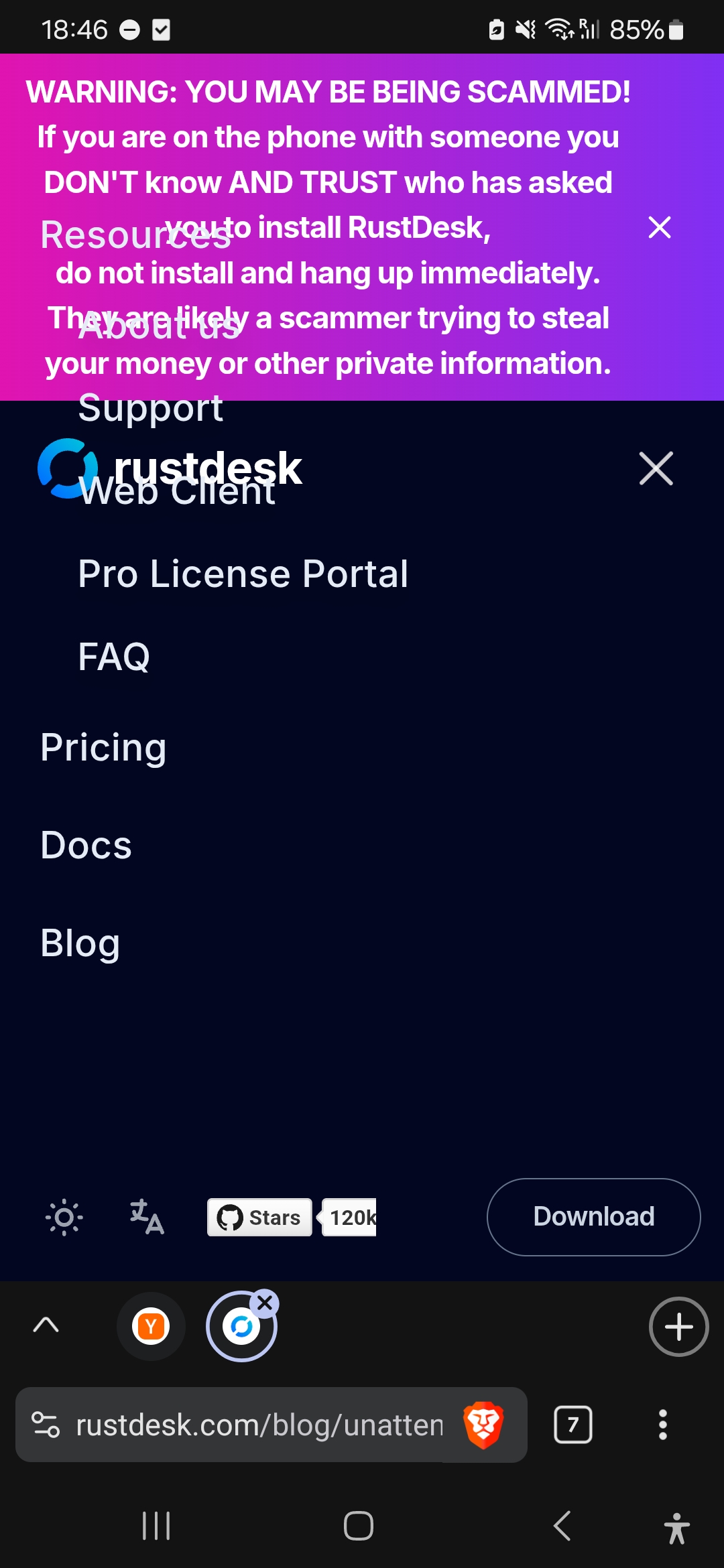
Menu css looks a bit dodgy with the notification at the top:
I have a Raspberry Pi hooked up to my TV and whenever I need to control it from my laptop (getting and interacting with the same screen on my laptop that I see on my TV) I have been using VNC. It is quite slow. Would this work better for that use case or is it really intended for something different? (And if the latter are there better solutions than VNC for what I want to do?)
Yes this will give you similar results.
There's VNC and VNC-likes (rdp, steam link, rustdesk, etc) which all do similar: stream a screen, allow remote keyboard/mouse, maybe redirect sound, maybe use video encoders.
There's also things like deskflow, which allow you to use one keyboard/mouse and control with multiple machines.
If you can look at your TV instead of your laptop, I highly recommend using KDE Connect
How does this work on a technical level?
Does it framebuffer grab the current session and inject input events?
Usually the way to be able to even get the login screen is to use DRM/KMS based capture and use uinput for device emulation. It doesn't strictly need root but it does need privileges a user wouldn't have, like access to the DRM card nodes and uinput device. Sunshine does it this way.
It entirely sidesteps the problem of X vs Wayland, although this does mean the unattended physical seat can be physically taken over while you are remote.
Yea I need to know this before I even consider something like this. I'm guessing it's a daemon that runs as root in the background.
Okay. The feature I'm waiting for is the self-hosted web client.
Btw does RustDesk support microphone input passthrough from client to the host yet?
So far it's only feature I found missing compared to proprietary solutions.
Unfortunately, no, it's not working. I use Rustdesk all the time. I've found a way, but it's really stupid. I have a GL.iNet Comet to manage my headless machine. That unit supports microphone passthrough. I send my mac's mic through that to ubuntu. It's an awful solution hah, but it works. I'm able to use dictation through that on Ubuntu. I didn't buy the comet specifically for mic use. I found out after the fact that it was able to do it.
I've been using rustdesk for years. I love it.
RustDesk works so much better and easier than vnc and other vendored solutions. No need to open ports, no need for vpn, it just works, no account BS, no vendor lock in BS.
I have used RustDesk for years, also run my own lookup/relay server so I do not need to rely on the public lookup server
While everything else gets enshitified RustDesk just keeps getting better
Without self-hosting, how can I be sure that the middleman server layer won't affect my security?
Definitely a lifesaver for tech support!
And the fact it's self-hosted is priceless.
wonder if it can support gaming and sounds too ?
so this means I can be on a vacation, turn on my ubuntu desktop remotely, login and control it ? I have a strong need for this as my desktop is also a server
This depends on libdrmtap "A (LLM AI coded) zero-dependency C library for DRM/KMS framebuffer capture on Linux" https://github.com/fxd0h/libdrmtap which doesn't actually seem to give remote access so much as remote access to the screen visuals. The other hard parts of remote access on the various waylands are still left up to more proprietary, per wayland compositor, custom extensions not in wayland core or exposed by the kernel. That is, not universal.
Kvm companies shutter
The problem I have with RustDesk is that self-hosting the server forces you to accept zero authentication (meaning anyone can use it to host streams for free), so you end up having to run it through a VPN which also decreases performance and latency, and makes it unusable as an easy IT help tool like people have been doing with VNC since forever (unless you relegate to using the slower public server controlled by who knows what).
And since the paid pro version does have authentication, I think it's unlikely to ever show up in the free version.
Rustdesk has been a nice alternative/replacement for Anydesk, I use both 10+ times a day. Was having issues getting any remote desktop working yesterday with my Orange Pi 5, so good to see this very issue being solved. It does sound like Wayland has some design issues in how difficult this has been though. If a piece of software needs to do this, it shouldn't be so obnoxiously difficult, as I've heard this is a major PITA with OBS too.
Funny that the video in the blog post still needs X. I will see myself out....
They've been working on Wayland for what, nearly 20 years now, and it still has not reached feature parity with 1996 Windows NT?
oooh any chance it can be integrated into guacamole?
Is Wayland finally feature complete to xorg or are they still refusing to?